
- Varieties of cables for the Internet
- How to crimp a twisted pair cable (Internet cable pinout)
- Pinout color schemes
- Crimping instructions
- Screwdriver crimping instructions
- Video: how to compress a twisted pair with a screwdriver - a visual instruction
- Crimping a four-wire twisted pair
- How to connect an internet cable to a power outlet
- RJ-45 connector crimp
- Internet cable connection scheme by color
- Crimping a twisted pair in a connector
- Video lesson: crimping the RJ-45 connector with pliers and a screwdriver
- What is twisted pair
- Species and types
- Choice of category and containment
- Number of pairs
- Crimp quality check
- How to re-crimp RJ-11, RJ-45
- The order of crimping a twisted pair of 4 cores
- Conclusion
- Computer networks
- Conclusions and useful video on the topic
Varieties of cables for the Internet
If we talk about the types of cables used to build modern local computing systems, there are a huge variety of them.
First of all, you should pay attention to the external construct, which prevents the influence of factors from the outside. It is conditionally possible to divide into the following types:
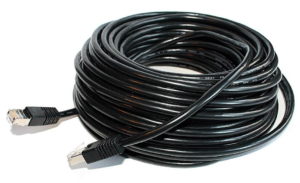
Street cable. It has a reinforced braid, resistant to moisture and ultraviolet, its thickness reaches about 2-3 mm. It can also be equipped with a steel cable for the convenience of laying overhead communication lines. Traditionally black.
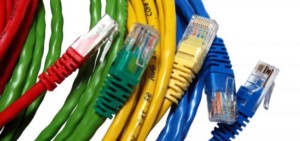
Indoor cable.In this design, the cores are protected by a PVC sheath up to 1 mm thick, which loses its properties when exposed to water or sunlight for a long time. In expensive versions, it may have an additional reinforcing core in the form of a nylon thread.
Note! When crimping, many unskilled specialists neglect the presence of a reinforcing thread, not leading it under the connector latch. This is fraught with cable breakage during sudden physical exertion.
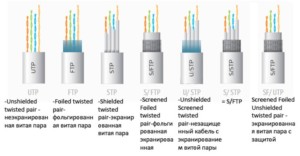
The second feature by which twisted-pair LAN is divided into subcategories is the presence of shielding. For this, special symbols for marking have been created: U - unshielded, unshielded, F - foil, the screen is made of foil, S - braided screening, the outer screen is in the form of a braided wire, TP - twisted pair, twisted pair (in fact, the main protection against electromagnetic interference), TQ - the presence of a separating screen for each pair of pairs (easier - four wires):
- U/UTP, all shields are missing;
- U/FTP, no external shielding, foil protected every two pairs;
- F/UTP, overall foil shielding, no additional EMI shielding applied;
- S/UTP, wire braid overall shield, no inner shield;
- SF/UTP, external screening combined, no core screening;
- F/FTP, both screens are made of foil;
- S/FTP, outer wire braid, inner foil;
- SF/FTP, external - combined, internal - foil.
And finally, it is customary to divide twisted pair into categories, on which the data transfer rate directly depends. It should be noted that categories from the first to the fourth are obviously obsolete and are not able to work in modern LANs, the rest are used for various tasks of designing data transmission channels:
- Category 5, 5e. Cables operating in the 100 MHz frequency band, the data rate is 100 Mbps if 2 pairs are used and 1 Gbps if four pairs are used. The prefix "e" denotes the use of improved technologies, due to which the diameter and cost are reduced. It should be noted that two-pair cables most often belong to category 5e.
- Category 6, 6A. The operating frequency band is 200 MHz and 250 MHz, respectively. In the first case, this is a U / UTP type cable, while the data transfer rate can reach 10 Gb / s with a limit of 55 meters. In the second case, when there is an “A” prefix, two types can occur - F / UTP or U / FTP, then a speed of 10 Gb / s is possible on a 100-meter segment.
- Category 7, 7A. The operating frequency band is 600 MHz and 1 GHz, respectively. These cables are rare, because they are approved by only one international standard, they also allow you to transfer information at a speed of 10 Gbps over long distances, and there are two types: F / FTP or S / FTP.

Note! The quality of the secondary network elements can significantly affect the final data rate in the line. For example, if a 6A cable is used, but at the same time an RJ45 socket is installed with a resistance that is inconsistent with this category, the LAN will not work correctly, up to a complete lack of communication between devices
How to crimp a twisted pair cable (Internet cable pinout)
For crimping twisted pair are used:
-
connectors - transparent plastic RJ45 adapters that allow you to insert the cable into the computer;
-
crimping pliers, also called a crimper - a tool with blades for stripping insulation and sockets to ensure good contact with the conductor.
Pinout color schemes
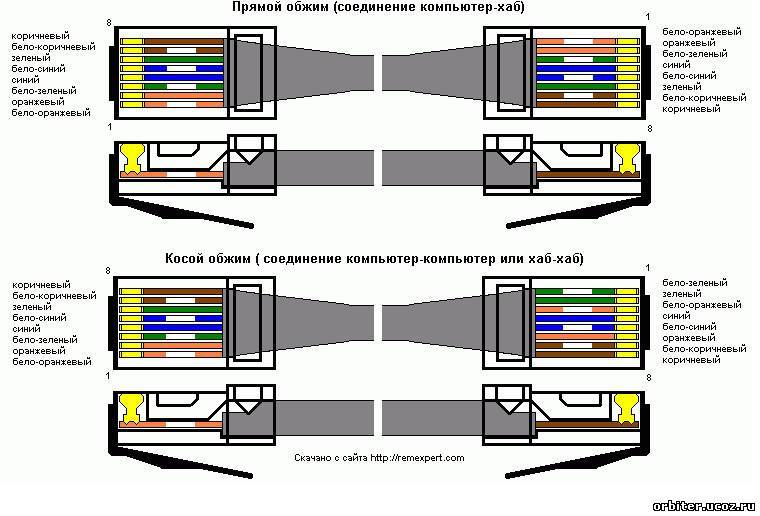
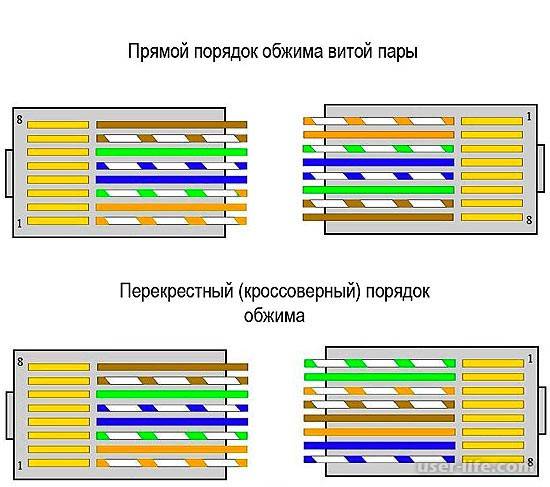
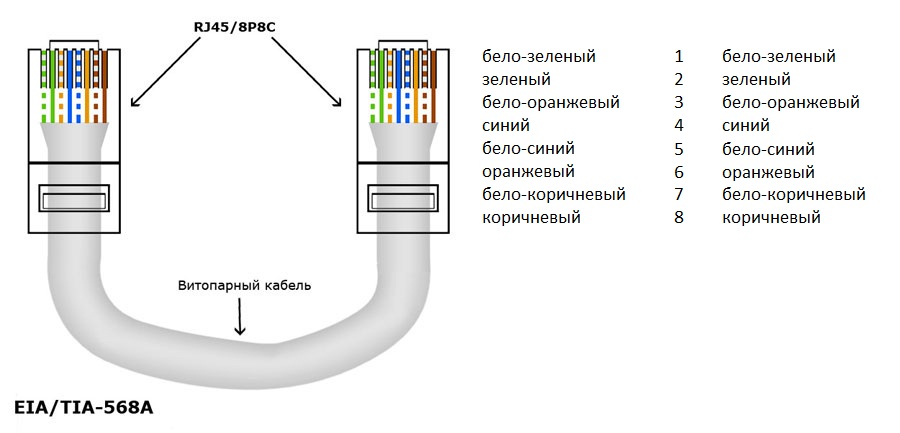
There are two main schemes by which twisted pair can be compressed: straight and cross.
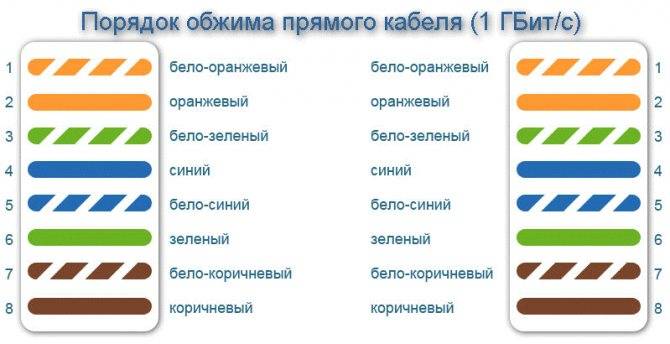
They differ from each other in the way the cable cores are arranged (pinout color scheme). In the first case, at both ends of the wire, the cores are arranged in the same sequence:
- white-orange;
- Orange;
- white-green;
- blue;
- white-blue;
- green;
- white-brown;
-
brown.
This method is used most often, for example, when you need to crimp a cable to connect devices of different purposes (computer, laptop, TV, etc.) with a router or modem.


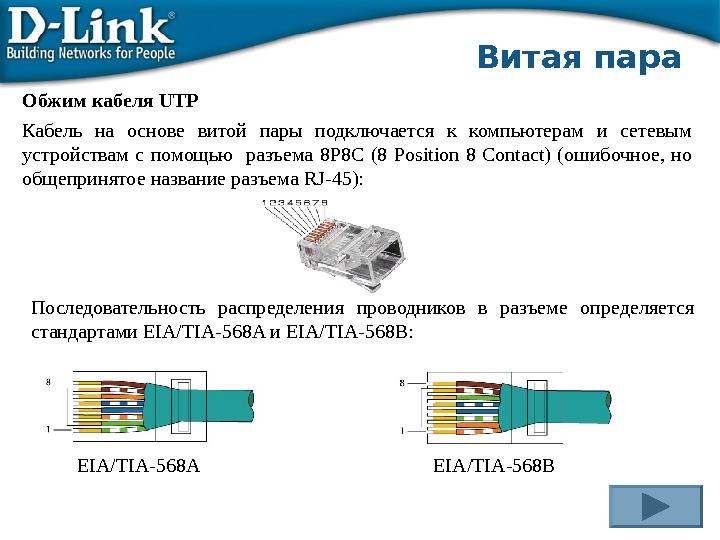


If it is necessary to cross-pinout, the cable cores in the first connector have the same sequence as in the previous case, and on the second they are arranged according to the following color scheme:
- white-green;
- green;
- white-orange;
- blue;
- white-blue;
- Orange;
- white-brown;
-
brown.
Cross crimping is used when connecting devices of the same purpose, for example, two computers or routers. But today it is almost never used, since modern network cards and routers can automatically detect the cable crimping scheme and adapt to it.
Crimping instructions
Compressing a twisted pair is quite easy:
- Prepare the cable, RJ45 connector and crimping tool.
-
Release the cable from the outer winding approximately 2-3 centimeters from the edge. To do this, you can use the crimper: it provides special knives.
-
Unwind and align twisted-pair pair wiring. Arrange them in the correct sequence according to the selected crimping pattern. Attach the cable to the connector and cut off the excess.Open wires must be left long enough for the sheathed cable to enter the bottom of the connector.
-
Trim excessively long wires with a crimper.
-
Insert all the wires of the cable into the connector to the very end.
-
Crimp the twisted pair cable with a crimper. To do this, insert the connector into its socket until it clicks and squeeze the tool handles several times.
I have crimped twisted-pair cables at home and at work more than once. It is very easy to do this with a special tool, the main thing is to correctly arrange the wires by color. But you need to carefully cut the outer sheath of the cable with a crimper. My experience shows that if you apply extra effort, then not only the outer insulation is cut, but also the inner cores.
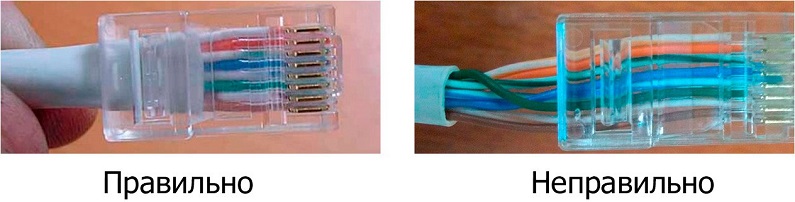
After the twisted pair is crimped, the outer winding should partially enter the connector. If the cable cores peek out of the connector, then the crimping must be done again.
The outer sheath of the cable must partially fit into the connector
Screwdriver crimping instructions
You can compress the cable not only with a special tool, but also with an ordinary screwdriver. This method is more time consuming, and the probability of a poor-quality result is higher. But it will be the only possible one for those who do not have a crimper at hand. To complete the work you will need:
- twisted pair;
- RJ45 connector;
- winding stripping knife;
- wire cutters to trim the wires;
-
flat screwdriver.
Crimp the cable as follows:
- Prepare the twisted pair in the same way as for crimping with a crimping plier.
- Insert the conductors into the socket.
-
Using a screwdriver, press each connector blade in turn so that it cuts through the winding of the cable core and comes into contact with the copper conductor.
- Check the result.
Video: how to compress a twisted pair with a screwdriver - a visual instruction
Crimping a four-wire twisted pair
In addition to the eight-wire twisted pair, there is also a four-wire. It is used less often because it provides a data transfer rate of no more than 100 Mbps (on a standard cable, the speed can reach 1000 Mbps). But such a cable is cheaper, so it is actively used in small networks with small and medium volumes of information.
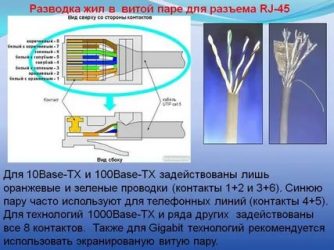
The process of crimping a four-wire twisted pair is the same as for an eight-wire twisted pair: the same connectors and crimping pliers are used. But at the same time, only a part of the contacts is used in the connector, namely 1, 2, 3 and 6, and the rest remain empty.
Color designations of conductors in a four-wire twisted pair can be different, but two options are most common:
- White-orange, orange, white-blue, blue.
- White-orange, orange, white-green, green.
The first and second contacts are always inserted with white-orange and orange wires, respectively. And in the third and sixth there will be either blue or green wires.
How to connect an internet cable to a power outlet
To begin with, it should be noted that there are two types of Internet outlets, like electrical outlets: for outdoor installation and for indoor installation.
- Indoor sockets are used when the Internet cable is hidden in the wall, just like electrical wires.
- And outlets for outdoor use assume that the Internet cable runs along the surface of the wall in the visibility range. Surface mount sockets are similar in appearance to ordinary telephone sockets that are attached to any surface.
At the same time, it should be noted that all sockets are collapsible and consist of three parts: half of the socket body serves for fastening, the inside of the socket is designed for connecting wires, and the second part of the body serves as a protective element. There are both single and double Internet sockets.
Computer sockets may differ in appearance, but they work the same way. All of them are equipped with microknife contacts. As a rule, they are designed to cut through the insulation of conductors, after which reliable contact is established, since the process is carried out under a certain gain.
RJ-45 connector crimp
An Internet cable that enters an apartment or house, which is most often called a twisted pair cable, often ends in a small plastic connector. This plastic device is the connector, and usually RJ45. In professional jargon, they are also called "Jack".
This is what an RJ-45 connector looks like
Its case is transparent, due to which the wires of different colors are visible. The same devices are used on connecting wires that connect computers to each other or to a modem. Only the order of location (or, as computer scientists say, pinouts) of wires can differ. The same connector is inserted into a computer outlet. If you understand how the wires are distributed in the connector, there will be no problems connecting an Internet outlet.

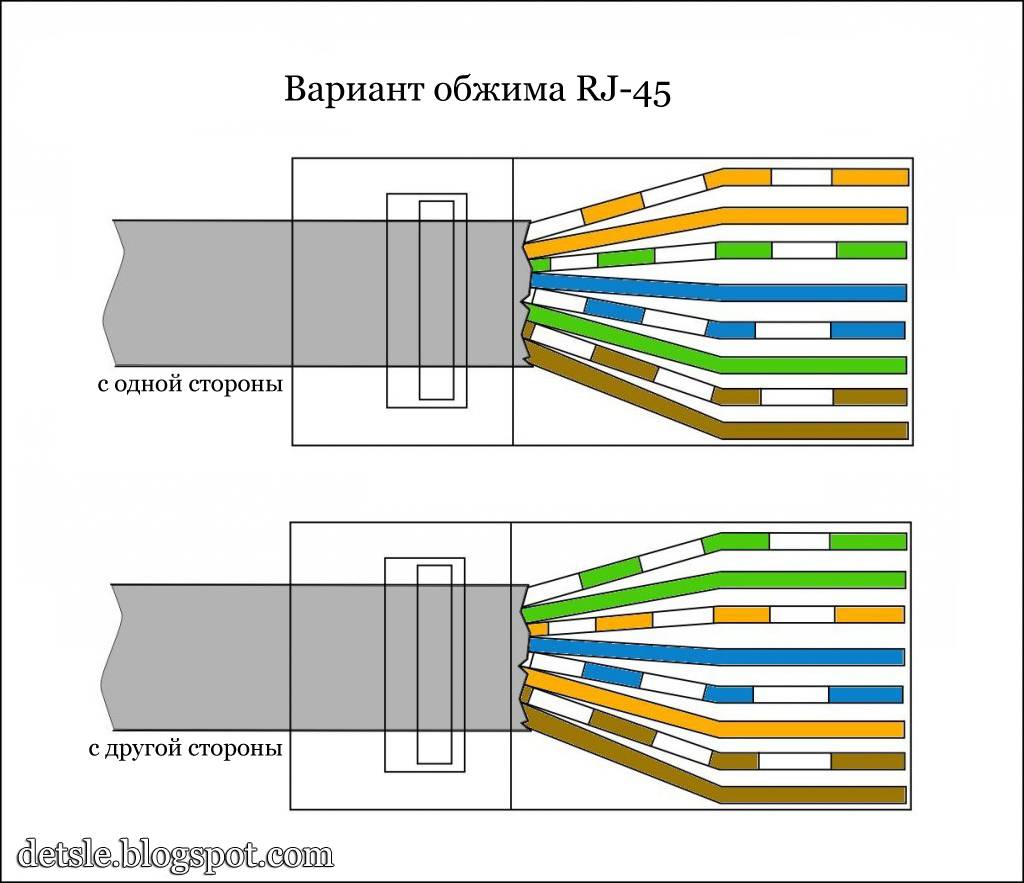
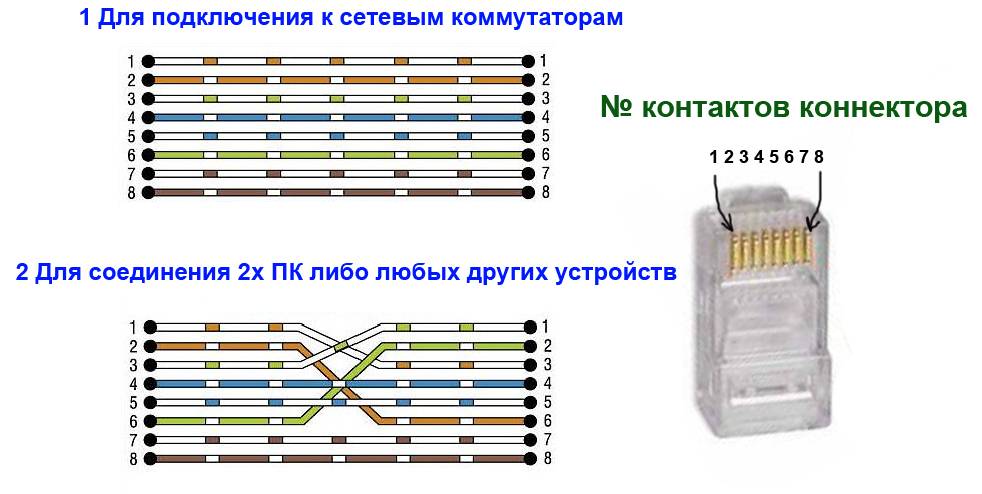
Internet cable connection scheme by color
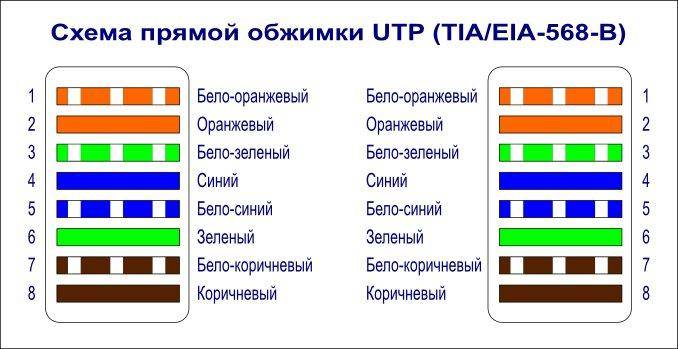
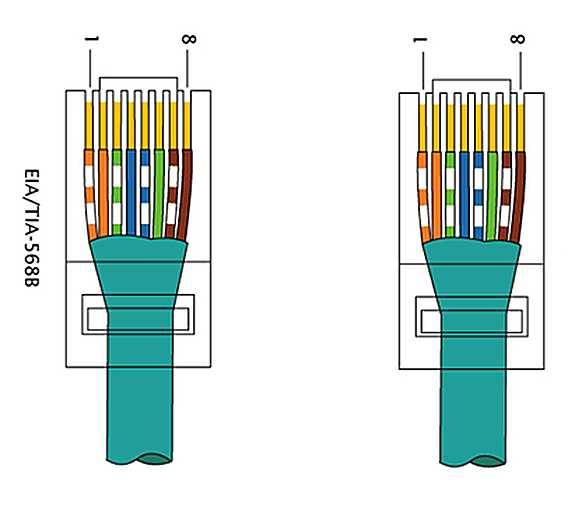
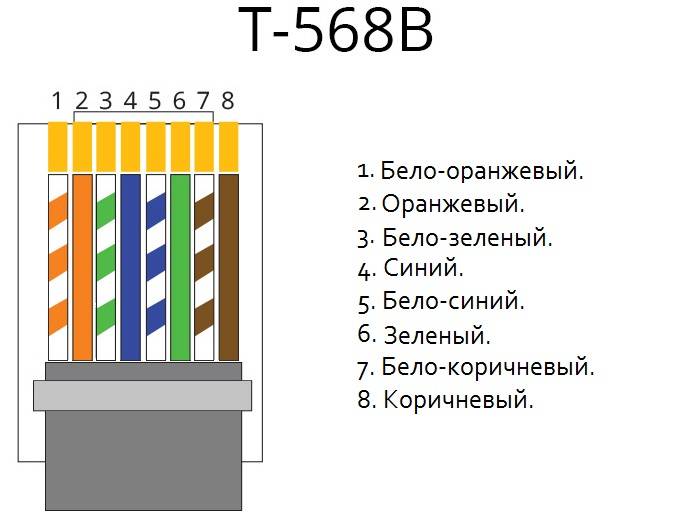
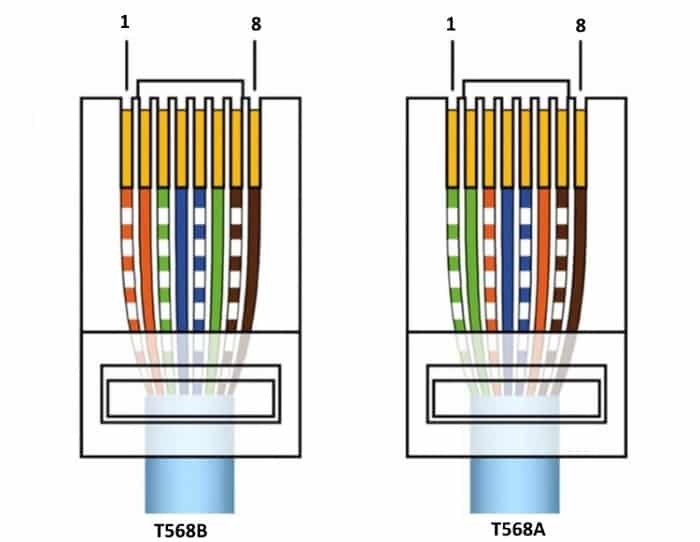
There are two connection schemes: T568A and T568B. The first option - "A" is practically not used in our country, and everywhere the wires are arranged according to the "B" scheme. It must be remembered, since it is it that is required in most cases.
Internet cable connection diagrams by color (use option B)
To finally clarify all the issues, let's talk about the number of wires in a twisted pair. This internet cable comes in 2-pair and 4-pair. For data transfer at speeds up to 1 Gb / s, 2-pair cables are used, from 1 to 10 Gb / s - 4-pair. In apartments and private houses today, mainly, streams up to 100 Mb / s are brought. But with the current pace of development of Internet technology, it is quite possible that in a couple of years the speeds will be calculated in Megabits. It is for this reason that it is better to immediately expand the network of eight, and not of 4 conductors. Then when you change the speed you do not have to redo anything. It's just that the equipment will use more conductors. The difference in cable price is small, and sockets and internet connectors still use eight-pin.
If the network is already wired two-pair, use the same connectors, only after the first three conductors laid according to scheme B, skip two contacts and lay the green conductor in place of the sixth (see photo).
Scheme of connecting a 4-wire Internet cable by color
Crimping a twisted pair in a connector
There are special pliers for crimping wires in the connector. They cost about $6-10 depending on the manufacturer. It is more convenient to work with them, although you can get by with a regular screwdriver and wire cutters.
Pliers for crimping connectors (one of the options)
First, insulation is removed from the twisted pair. It is removed at a distance of 7-8 cm from the end of the cable. Under it there are four pairs of conductors of different colors, twisted in twos. Sometimes there is also a thin shielding wire, we simply bend it to the side - we do not need it. We unwind the pairs, align the wires, spreading them in different directions. Then fold according to the scheme "B".
How to terminate an RJ-45 connector in a connector
We clamp the wires in the right order between the thumb and forefinger, lay out the wires evenly, tightly to each other. Having aligned everything, we take wire cutters and cut off the excess length of the wires laid out in order: 10-12 mm should remain. If you attach the connector as in the photo, the twisted pair insulation should start above the latch.
Cut off so that the wiring remains 10-12 mm
We put a twisted pair with cut wires into the connector
Please note that you need to take it with the latch (protrusion on the cover) down
Putting the wires into the connector
Each conductor must get into a special track. Insert the wires all the way - they should reach the edge of the connector. Holding the cable at the edge of the connector, insert it into the pliers. The handles of the pliers are brought together smoothly. If the body has become normal, no special efforts are required. If you feel that it “does not work”, double-check whether the RJ45 is in the socket correctly. If everything is fine, try again.




When pressed, the protrusions in the tongs will move the conductors to the micro-knives, which will cut through the protective sheath and ensure contact.
How crimping pliers work
Such a connection is reliable and problems with it rarely occur. And if something happens, it’s easy to remake the cable: cut off and repeat the process with another “jack”.
Video lesson: crimping the RJ-45 connector with pliers and a screwdriver
The procedure is simple and easy to repeat. It may be easier for you to do everything after the video. It shows how to work with pliers, as well as how to do without them, and do everything with a regular straight screwdriver.
What is twisted pair
Twisted pair is a special cable that consists of one or more pairs of copper wires in a protective sheath, twisted together with a certain pitch. If there are several pairs in the cable, their twist pitch is different. This reduces the influence of the conductors on each other. Twisted pair is used to create data networks (Internet). The cable is connected to devices through special connectors that are inserted into standardized equipment connectors.
A set of tools used by professionals
Species and types
Twisted pair may or may not be secure. The shielded pair has aluminum foil or braid shields. Protection can be general - for the cable - and pairwise - for each pair separately. For laying indoors, you can take an unshielded cable (UTP marking) or with a common foil shield (FTP). For laying on the street, it is better to take with an additional metal braid (SFTP). If a twisted pair runs in parallel with electrical cables along the route, it makes sense to take a cable with protection for each pair (STP and S / STP). Due to the double screen, the length of such a cable can be more than 100 m.
Twisted pair - cable used to connect wired internet
There is also a twisted pair stranded and single-core. Single-core wires bend worse, but have better characteristics (the signal can be transmitted over long distances) and tolerate crimping better. They are used when connecting Internet outlets. In this case, the cable is fixed during installation and then hardly bends.
A stranded twisted pair bends well, but it has greater attenuation (the signal passes worse), it is easier to cut it during crimping, and it is more difficult to insert it into the connector.It is used where flexibility is important - from an Internet outlet to a terminal device (computer, laptop, router).
Choice of category and containment
And a little more about categories. To connect to the Internet, you need a twisted pair cable of at least CAT5 category (you can use CAT6 and CAT6a). These category designations are embossed on the protective sheath.
to conduct the Internet, you need to buy a twisted pair cable of certain categories
And a few words about the color of the protective sheath and the shape of the cable. The most common is a gray twisted pair, but there is also an orange (bright red) twisted pair. The first type is ordinary, the second is in a shell that does not support combustion. It makes sense to use a non-combustible twisted pair cable in wooden houses (just in case), but there is no particular need for this.
The shape of a twisted pair can be round or flat. Round twisted pair is used almost everywhere, and flat twisted pair is needed only when laying on the floor. Although no one bothers you to put it under the plinth or in a special plinth with a cable channel.
Number of pairs
Basically, twisted pair is produced from 2 pairs (4 wires) and 4 pairs (8 wires). By modern standards, at speeds up to 100 Mb / s, two-pair cables (four wires) can be used. At speeds from 100 Mb/s to 1 Gb/s, 4 pairs (eight wires) are needed.
It’s better to immediately take a cable for 8 wires ... so as not to have to pull
Currently, the data transfer rate for an Internet connection for private houses and apartments does not exceed 100 Mb / s, that is, you can take a twisted pair of 4 wires. But the situation is changing so quickly that there is no guarantee that in a few years the threshold of 100 Mb / s will be exceeded, which means that the cable will have to be pulled. Actually, already now there are tariffs with a speed of 120 Mbps and higher.So it's better to pull 8 wires at once.




Crimp quality check
To make sure that the work done is correct, by crimping the Internet cable in one way or another, it must be tested.
There are several ways to check.
- LAN tester. Or just a cable tester. This is professional equipment, which is usually used by service center employees when serving customers. This tester is different in that it can interact with a large number of different connectors. Both ends of the Internet cable must be inserted into the correct connector. The indicator will then show if there is a connection between the nodes. There is nothing difficult in understanding the work of the tester. But buying it for personal use is not particularly profitable.
- Multimeter. If you are a motorist or an electrician, and you have a multimeter at your disposal, it will be a great help when checking a crimped connector. It is required to attach the probes of the multimeter to the ends of the cable corresponding in color, and look at the indicators of the device. In the ringing mode, a connection is established between the lines. If it is, the device will show this in the form of an audible signal and the corresponding data on the display. In all pairs of the cable under test, the resistance indicators should be approximately the same. If the difference is large or the resistance is too high, look for an error in the work done. She is somewhere. And it will have to be corrected.
- Direct connection. The easiest way to check the functionality of a crimped cable is by connecting it directly to a computer or router. If the red cross has disappeared from the network connection icon and a computer with a plug is displayed, then there is an Internet connection, everything should work.
As you can see, it is possible to compress the cable at home and restore the Internet. There is nothing complicated here.
It's good to have a special tool at your disposal. But practice clearly shows that in many situations it is quite possible to do without it.
As you have noticed, it is not difficult to compress the power cord yourself. I would also like to note that with the correct execution of the actions, the result of working with both press tongs and a screwdriver will be the same. Therefore, the choice of a tool for crimping a network Internet cable at home is up to you.
How to re-crimp RJ-11, RJ-45
There are, it seemed at first glance, more impasse situations. It is urgent to crimp the RJ-11 or RJ-45 plug onto the network cable, but there is no new plug at hand. There is also a simple solution for this problem. It is necessary to clamp the fork body in a vice by the latch and pull the lamellas out of the seats by 1 mm, prying them alternately from the ends with an awl.
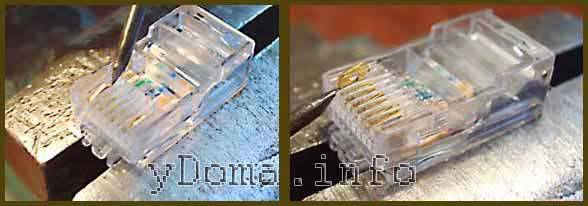
Use a knife to cut the latch from the near side to the cable, remove it and remove the old twisted pairs. I disassembled the RJ-45 plug completely to demonstrate its components.
Crimp new twisted pairs into an RJ-11 or RJ-45 plug using the technology described above.
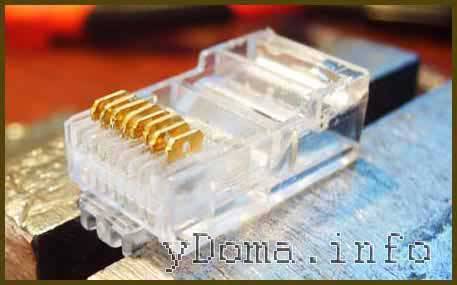
Since the utp cable lock was removed when disassembling the plug, it is necessary to fix the cable in the plug by dropping a few drops of silicone, glue or sealant into the window formed from the removed latch. If there is a need to lengthen or repair damage to a twisted-pair cable, then this can be done by soldering or twisting. The reliability of a solder joint exceeds any mechanical methods.
The order of crimping a twisted pair of 4 cores
Crimping a 4 core twisted pair begins with the preparation of the necessary tools and materials.
- First of all, separate a piece of cable of the required length from the bay. The cut does not have to be straight, since we will cut the ends of the conductors a little later.
-
Step back from the cut 40-50 mm. Use a stripper, pliers blade, or other tool to make a circular cut in the insulation. Be careful not to damage the inner veins.
- Since a four-core cable is one and a half times thinner than an eight-core cable, we recommend wrapping the part of the outer insulation that will go into the connector with several layers of electrical tape. This will increase the reliability of the fastening.
-
After that, unwind the twists and arrange the conductors in the desired order. The bottommost (sixth vein) is slightly separated from the rest.
-
Measure 12-14 mm from the cut of the outer insulation and cut the wires at this level. The cut line should be strictly perpendicular to the cable axis.
-
Insert the wires into the connector, holding it with the contact side facing you. Make sure that the first three veins go to the first three contacts, and the last to the sixth. The ends of the conductors must rest against the front wall of the connector.
-
Clamp the connector with crimping pliers (socket “8P”). Squeeze them until you hear a click.
-
-
After clicking, release the patch cord and check the strength of the connection: pull the connector and cable in different directions. High-quality crimping, even with considerable effort, will not suffer.
- The last thing we have to do is test the patch cord. Connect twisted pair
xk cable tester, turn it on and observe the glow of the indicators. Green lights opposite a pair of contacts indicate the integrity of the wire.Lack of glow - that the wire is not connected to the connector or is broken inside the cable. A red glow indicates a crossover or short circuit. -
In our case, the fourth, fifth, seventh, eighth contacts are not connected, so there will be no indication near them. The rest should flash green.




Conclusion
Today you have mastered the rules for crimping a twisted pair consisting of four conductors. With an eight-core cable, we hope, we figured it out too.
Computer networks
In order for the computer network to work correctly, you need to perform the correct pinout of the conductors in the connector. At the same time, the connection scheme to the contacts is preserved. Twisted pairs that do not fit close to the RJ45 plug are usually crimped, but the signal is not transmitted over them and they can be used to transmit additional information. With its help, you can interconnect several types of network equipment.
With the correct arrangement of the wires, excessive force will not have to be applied.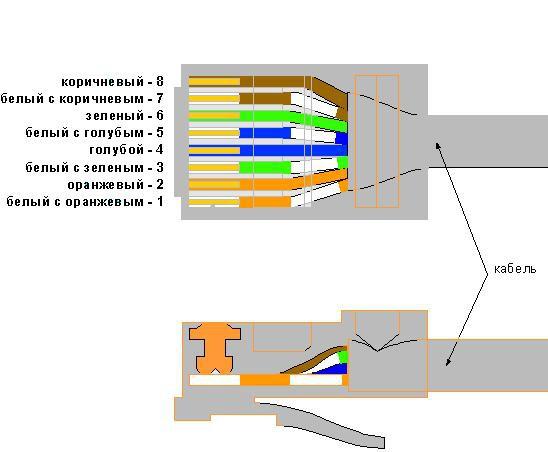
The outer insulation of the cable should be in the connector housing, if this does not happen, you need to cut the ends shorter.
And an unscrupulous manufacturer makes such a marking that when touched, it is erased, or it is not on the cable at all.
You may also need a crossover cable to network old switches into a network through up-link ports. How to crimp without a tool - video.
Crimping process Crimping is best done using a special tool.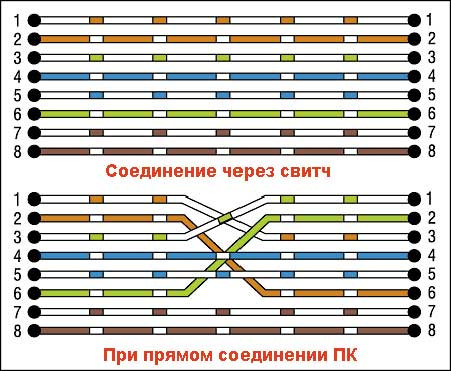
In most cases, closer to the handles of the tool, knives are placed to cut the twisted pair wires. Checking which pin is not connected correctly can be done using a conventional multitester.
Power supply to the IP camera over twisted pair
Read more: Depth of power cable laying
Conclusions and useful video on the topic
The video below shows a household version of cable crimping, the use of a special tool and a step-by-step process.
This video, although not quite technically correct, will help you understand the essence of the process more fully.
The procedure for crimping the copper strands of a network cable can be studied theoretically without much difficulty. Meanwhile, even in the presence of theoretical knowledge, a practical skill is required.
In fact, this skill is developed quite quickly even when you have to face work for the first time. True, a novice master cannot do without spoiling a couple of plastic forks - you will first have to practice. This is the law of practice.
Please leave comments, post photos and ask questions in the block below. Tell us about how you crimped a twisted pair cable with your own hands. Perhaps you know the tricks and methods that will be useful to site visitors.



