
- Setting procedure for tablet
- Android
- iOS
- Windows phone
- What equipment to choose?
- How to connect unlimited 4G Internet in the private sector: in the country house, cottage or country house?
- Internet center features
- Internet governance
- Through personal account
- Internet Center Yota
- Megaphone or Yota
- Tariff policy
- Tariff for modems and routers
- Internet tariffs Yota for phone
- Distinctive features of a good antenna
- About Internet Yota
- How to strengthen the Yota modem signal if the Internet does not work well
- Tariff for tablets
- Unlimited Internet Yota for smartphones
- Advantages and disadvantages of mobile access
Setting procedure for tablet
Now you can consider how to set up Internet Yota on a tablet. To connect and optimize a tablet gadget to the Internet, you need an operator's SIM card with a special tariff for a tablet. You can buy it in any official salon of the operator or on his website. Before buying, be sure to inform that you need a card for the tablet. If the card is purchased, then you can proceed to the settings.
Important! Iota cards initially do not have a number, that is, the user can choose any sequence of numbers he likes from those available to him and assign it to the purchased SIM card after its activation
Android
For the most popular operating system, the sequence of actions is as follows:
- Open the Settings menu;
- Find the section Wireless networks and select "More";
- Select the Mobile network and find the “APN access point” item in it;
- Create an access point with the name parameter "internet.yota". You don't need to touch other fields.
iOS
The steps for iPhones and iPads are somewhat similar to Android and include the following steps:
- Open the Settings menu;
- Click on "Cellular Data";
- Find cellular data settings in them;
- Open APN settings;
- In the "APN" field, enter the value internet.yota and save everything.
Windows phone
For Windows owners, the instructions are as follows:
- Open Settings;
- Click on the item "Access Point";
- Select the inscription "Add";
- Write the already familiar internet.yota value in the APN line.
After that, you need to restart the device and download an application from the official website that allows you to set up a tariff for the Iota tablet.
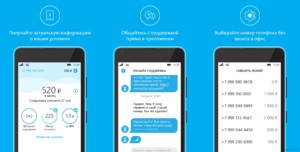
In conclusion, we can say that setting up yota Internet on a tablet does not take much time and effort. Absolutely every person who is far from technology will be able to configure all the settings. The operator performs most of the manipulations independently.
*Prices are current as of December 2019.
What equipment to choose?
To connect Iota's home Internet, you first need to get a SIM card at the nearest sales office. The second step will be the selection of suitable equipment. It directly depends on the number of devices that will connect to the network. The range of modems and routers from Yota is quite large:
- USB modem that connects to a computer or laptop. It has a special slot for placing Iota SIM cards, and visually the device resembles a regular USB flash drive with a retractable USB connector. The cost of such pleasure is only 1900 rubles;
- USB modem that distributes the Internet connection via Wi-Fi.This device, which is also no larger than a flash drive, has a built-in access point. It is bought in a small apartment where you need to use a computer, smartphone and tablet PCs at the same time. It costs 2400 rubles;
- Battery powered router - suitable for operation in a large apartment or house. It is also convenient to carry with you, so it is indispensable when traveling, which has earned a lot of positive feedback from freelancers. It distributes wireless Iota Internet for a computer, phones, laptops, tablets (up to 8 devices are connected at the same time). The price of equipment is 2900 rubles;
- Full-fledged routers-routers. For example, Yota Ready New, Ready Omni II, Viva. These models are suitable for creating your own home or office LAN. They are also used in cottages, because they have special connectors for connecting external antennas that amplify the signal (relevant for country houses). The advantage of these devices is a large radius of signal distribution. The setup is quite simple: you need to connect the device, create an Iota access point and come up with a password. The cost of routers varies between 4400-5900 rubles, depending on the model.
If you need Internet for one PC or laptop, then the modem will be the most inexpensive and compact portable solution. If there are many gadgets in the house that need constant Internet, then it is better to purchase a powerful router from the line proposed above.
How to connect unlimited 4G Internet in the private sector: in the country house, cottage or country house?
- You call us or leave a request on the site.
- Our specialist (at a convenient time for you) leaves for you.
- The required antenna power is determined.
- Equipment is being installed. Wi-Fi is connected and configured.
Equipment delivery service and signal strength testing - FREE OF CHARGE.
Yota install
12 years in the market of telecommunication services.
Unlimited Internet ANYWHERE in Moscow and the Moscow region.
Connect to 4G YOTA with us!
The federal wireless operator Yota (Yota) provides mobile communication services and unlimited wireless access to the Internet. The most important advantage of the operator is that it can offer truly unlimited Internet access, without restrictions on speed and traffic. Yota unlimited internet is available for smartphones, tablets and computers. Yota tariffs provide for the possibility of flexible settings, so that each subscriber can create a tariff plan that best suits his needs.


Initially, Yota unlimited Internet was available only to subscribers in large regions of Russia, but after the merger of the assets of MegaFon OJSC and Scartel LLC (Yota brand), the situation has changed dramatically. At the moment Yota is operating in MegaFon's network, thanks to which even the most remote regions of Russia can use the services of this operator. If your locality has a MegaFon connection, then you can connect Yota unlimited internet.
Attention
Internet center features
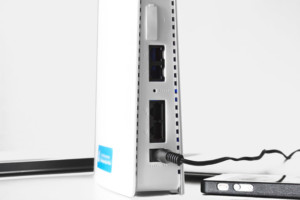
The stationary Internet center from Iota is a powerful modem and a full-fledged router in one "person". It is used for home and local Internet connection. The device has the possibility of multi-user connection to the global network, which means that more than one user can connect to it at the same time. The speed will remain the same.
Important! The appearance of the device fully corresponds to the appearance of classic routers or modems: it is flat, rectangular and contains on its body various LEDs and ports for local connection, IP telephony connection, a SIM card slot, a power input and a reset button for the router "Reset ". Iota mostly uses devices not of its own production
Most often, these are Gemtek devices. Their feature is a high signal transmission power, and it does not matter whether the transmission occurs wirelessly or via a LAN cable. Another feature was the ease of setting it up, as well as the ability to connect devices for IP telephony (two devices with two different numbers)
Iota mostly uses devices that are not of their own production. Most often these are Gemtek devices.
Their feature is a high signal transmission power, and it does not matter whether the transmission occurs wirelessly or via a LAN cable. Another feature was the ease of setting it up, as well as the ability to connect devices for IP telephony (two devices with two different numbers)
Internet governance
In the case of most devices that do not require the installation of additional software, Internet management is carried out through a personal account on the official website. This is true for the following categories and models:
- USB modem;
- Wi-Fi modem;
- Yota Many.
Through personal account
The first step after signing the contract is to register in your personal account. To do this, it is recommended to perform the following steps in sequence:
Connect your device to your computer or connect to it via Wi-Fi.
to initiate the registration procedure
It is important to note that it is necessary to open the page through the network of the Yota modem or router. If the system does not detect it, then you will not be able to continue.
Read the brief information and click on "Continue".
Now you need to enter a contact phone number
It can be any operator. After filling in the field, click "Continue". Enter the confirmation code you received to proceed to the next step.
Fill out the form with the following information:
Name and surname;
Password and its repetition;
Secret question and answer to it;
E-mail address;
Contact phone number;
Click on the "Create Profile" button.
Now you can set up a tariff plan and start using the company's services.
In the future, the tariff can be changed at any time in your personal account. To manage services, you need to log in using the following algorithm:
Internet Center Yota
Previously, on some models of modems and routers from Iota, a special program for managing services was installed. This is a Yota Access application with quite extensive functionality:
- Check connection status;
- Monitoring the volume of received and sent Internet traffic;
- Change tariff plan settings.
Due to the appearance of a functional personal account on the official website, Yota Access has become irrelevant. Therefore, the company decided to stop supporting it. Now it is impossible to download the software from the official site. Internet center owners can manage services through the personal account.

Megaphone or Yota
If you start from the basics, then Iota is a subsidiary of Megafon, so it actively uses the coverage area of its "big brother".This explains the loud start of the provider in the cellular market, when the "newcomer" immediately received a developed network.
Despite this, Yota may well be considered an independent company, which, in addition to the provided lines, is actively developing its own service towers.
If we talk about the quality of the Internet, then there are significant differences between these competitors. In particular, Iota removed the unlimited for smartphones, leaving it on tablets and modems. In addition, users are offered a single tariffication of services throughout the country. The disadvantages of the provider include the following features:
- SIM cards work only on specific devices, so you won’t be able to move a SIM card from a smartphone to a tablet and use the connection in full.
- Modems work only with 4G, so residents of regions where this network is not available can forget about wireless home Internet.
- Through Iota SIM cards, you cannot distribute traffic to other subscribers or download torrents.
Megaphone is devoid of these shortcomings, however, it cannot yet offer unlimited Internet for tablets and modems. In addition, when leaving the home region, subscribers have to incur additional costs or connect additional options, which significantly increases the final cost. Therefore, if subscribers need the Internet specifically for travel, it is better to give preference to Yota, but here you need to take into account the fact that there may not be a 4th generation network in the region, so the device will be useless.
Tariff policy
As you know, Iota has one tariff plan for personal computers and laptops using a USB modem. The fee is based on the time the service is provided.If the client uses a 4G LTE modem, the price for the tariff will be based on the number of days of connection to the network with unlimited traffic. The ISP offers the following options:
- Two hours for 50 rubles;
- Day for 150 rubles;
- Month for 1400 rubles;
- A year for 9000 rubles.
Important! There is also the possibility of temporarily activating the Internet at the highest possible speed. This is necessary to let a person understand whether he wants to use the services further, and not blindly connect on conditions that he does not like for a month or even for a whole year
A tariff plan for a day is no different from longer ones in time, except that it is issued for 24 hours, that is, for a day. The connection speed does not directly depend on this. Such a tariff is suitable for those people who are on the road or use a Yota modem when the main provider has failed or started technical work for a long time.
The Iota tariff for the modem is also represented by a monthly subscription (for 30 days). It is one of the most popular. You need to use it in the following cases:
- When there is no desire to pay for an annual subscription;
- When a person is not ready to give a large amount for a service, which, perhaps, he will use extremely rarely;
- When the subscriber is not satisfied with the Iota pricing policy when paying for the year.
- They are not ready to give a large amount for something that they may not use;
- Subscribers are not satisfied with such a pricing system for tariff plans.
Important! The cost of the tariff per month also depends on the speed. If the user is satisfied with 64 Kbps, then there is no need to pay
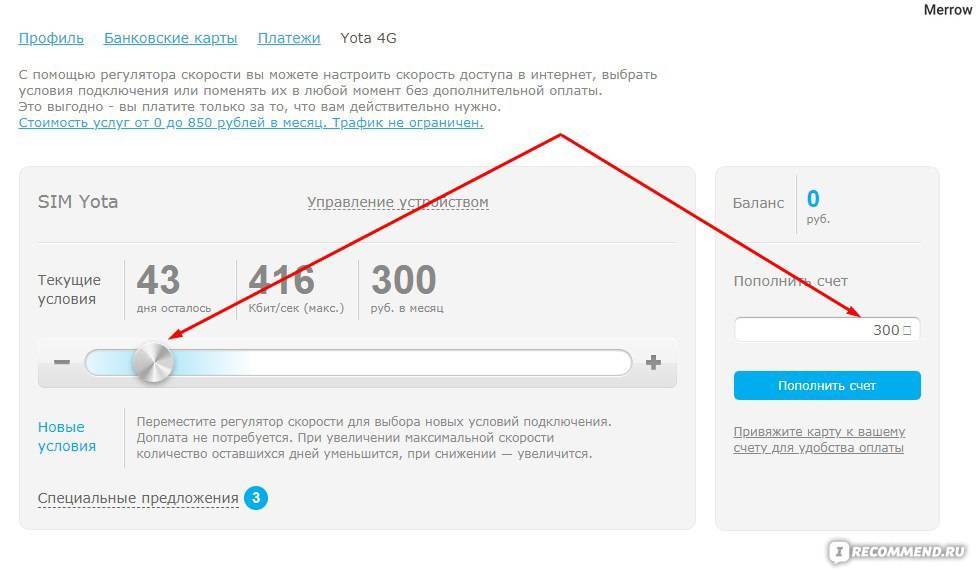
The maximum speed is available from 1000 rubles or more. Another advantage of Iota is that you can independently determine the price for services by selecting the main parameters of the Internet.You can do this in your personal account thanks to the switches that are set to the desired position.
If a person is an active user of the network, is in it every day for many hours, then a profitable subscription for a year will suit him. This will not only save money, but also allow you not to think about paying every day or month, eliminating the need to constantly deposit money into the account.
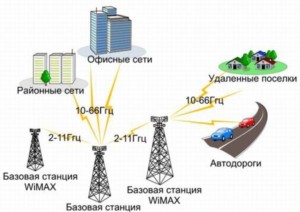
The options for an annual subscription under the terms of the operator are as follows:
- Without speed limits - 9000 rubles;
- Up to 5 Mbps - 5400 rubles;
- Up to 10 Mbps - 6900 rubles.
Tariff for modems and routers
Now consider the Internet tariff from Yota for a computer. You need to purchase a modem, router or a whole Internet center with telephony connectors. All this is sold at Yota service offices. Moreover, any device can be delivered to your home or office for free.


What is the Yota (Yota) tariff for a modem or router? Here we can choose the period for which the services will be provided - for 30 days, for 2 hours or for 24 hours. Network access for 2 an hour will cost us 50 rubles, after which the speed will be limited to 64 kbps (free of charge, for any period). But paid two hours are provided at maximum speed (Internet speed from Yota in 4G networks can reach several tens of megabits per second). The same applies to the package for 24 hours, the cost of which is 150 rubles.
As for access for 30 days, here we can adjust the speed of access at our discretion:
- Full unlimited speed - 1400 rubles / month;
- 15 Mbps - the subscription fee will be 1350 rubles / month;
- 12 Mbps - monthly payment will be 1300 rubles;
- For 10 Mbps we will pay 1250 rubles/month;
- The speed of 9.2 Mbps will cost us 1200 rubles / month;
- Monthly payment for 8.5 Mbps will be 1150 rubles;
- For an access speed of 7.8 Mbps, we will have to pay 1100 rubles / month;
- The subscription fee for 7.1 Mbps will be 1050 rubles/month;
- Internet at a speed of 6.4 Mbps will cost us 1000 rubles / month;
- By reducing the speed to 5.7 Mbps, we will pay 950 rubles per month;
- 5 Mbit - our monthly payment will be 900 rubles;
- 4.1 Mbps - the subscription fee for such a speed is 850 rubles / month;
- Modest 3.1 Mbps will cost subscribers 800 rubles / month;
- If you reduce the speed to 2.1 Mbps, then the monthly fee will be 750 rubles per month;
- For Internet at a speed of 1.7 Mbps, we will pay 700 rubles per month;
- 650 rubles/month - this is the subscription fee for the speed of 1.3 Mbps;
- More than a modest 1 Mbit will cost users 600 rubles / month;
- For 550 rubles / month we will get a speed of 896 kbps, which is not much different from one megabit;
- Reducing the speed to 768 kbps (enough for surfing), we will receive a monthly fee of 500 rubles per month;
- For a speed of 640 kbps, you need to pay 450 rubles / month;
- For honest half a megabit, you will have to pay 400 rubles / month;
- As for 64 kbps, you do not need to pay for such a speed - use Internet access for free.
Customize your tariff as you like, changing the speed when it suits you - all recalculations will be made automatically by the network. To find out how to test the speed of Iota, read the detailed review on our website.
 In order to connect the Internet to Yota on your phone and tablet, you need to order a SIM card using an application for Android OS or iOS - the SIM card will be delivered to the specified address. In addition, we can order a SIM card using the form on the operator's website, or purchase it at the service office.Do you need to connect to the Internet on your computer? Then order a suitable device - a router, modem or Internet center. Once it's delivered, you can connect it to your computer and go online.
 In order to disconnect the Internet from Yota, you need to untie the device in your profile by clicking on the "Device Management" link. If necessary, we will be able to bind the device back and continue using the communication services. If there is a need to completely refuse communication services and withdraw money from your profile, you need to fill out an application form for termination of the contract and transfer it to the Yota service office.
 Mobile operator and wireless Internet provider Yota has done everything possible to make access to communication services as simple as possible. All devices are configured as easily and without any difficulties - more on that later. Internet settings from Yota on Android are made by creating an access point with the name YOTA and specifying APN - intermet.yota. We leave the access point type as default, do not fill in the rest of the fields - we do not need them. But in 99% of cases, Android smartphones and tablets are configured automatically.
The same applies to devices on iOS and Windows Phone - if automatic settings are not installed, we prescribe the access point manually. As soon as everything is ready, we activate the data transfer, go to any site, wait for the redirect to the registration page and create your Iota profile there - thanks to the tips, you will cope with this task without much difficulty.
The Internet from Yota is set up in the same way on the computer - we connect the modem, wait until it connects to the network, after which we go to any site, wait for the redirect to the profile creation page and register. After registration, we replenish the account and use the services - the price of the Internet depends on the chosen speed.
Internet tariffs Yota for phone
The development of communication technologies has led to the fact that we are paying more and more attention not to voice calls, but to communications via the Internet. That is why all operators, including Yota, take care of providing inexpensive tariffs for network access
Internet tariffs from Yota are good in that they offer us an almost complete absence of traffic limits (except for tariffs for smartphones). Moreover, if we access the Internet using a modem, then we may not pay for network access at all - the operator provides bonus free access at speeds up to 64 kbps. True, normal surfing is impossible at such a speed, but it will be possible to communicate via Viber, Skype, ICQ and other instant messengers. If we want to connect to the network of a new operator, then we will see that there are not so many Internet tariffs from Yota. But they can be fully customized by adjusting the parameters and the set of services in your profile.
That is, Yota has realized the dream of many people - the creation of a personal tariff. However, let's look at the rates in more detail. Mobile Internet from Iota on a smartphone has been provided since January 25, 2017 with limits (unlimited for a smartphone for 240 rubles has sunk into oblivion). But there is a plus - we get the opportunity to use traffic for free within some applications (with unlimited mobile Internet for instant messengers and social networks).
Yes, the unlimited from Iota is gone, but mobile communications have not become less profitable. Today, the connection conditions in Moscow and the Moscow Region are such that subscribers can independently set up their tariff plan - the network has a separate choice of minutes and traffic packages. Here are just some options for Yota packages:
- 200 minutes in Russia and 2 GB of traffic - 370 rubles / 30 days;
- 200 minutes 10 GB - 480 rubles / 30 days;
- 800 minutes and 5 GB - 700 rubles / 30 days;
- 5000 minutes and 15 GB - 2750 rubles / 30 days.
Alternative options are also available. In some regions, lower prices apply - for example, the minimum package can be bought for 290 rubles and even 250. The Internet speed for a smartphone varies widely - up to 5-6 Mbps in the 3G coverage area and up to 10-20 Mbps in the 4G zone.
If the main traffic package implies a certain limit, then unlimited is available for social networks and instant messengers. Each service is connected separately - social networks cost 25 rubles / 30 days, messengers - 15 rubles / 30 days. The option "Unlimited SMS" is paid separately - 50 rubles / 30 days.
Distinctive features of a good antenna
The main thing is high-quality and stable signal amplification. At the same time, if possible, the product should not take up too much space, require constant manipulations to set it up or move it around the area of the apartment / house.
Electronic parts must be manufactured in accordance with current standards, this is important, since some elements (capacitors, diodes, etc.) have a certain service life. The quality of the complexes should be guaranteed by the manufacturer, it is desirable that there is a support service capable of solving all the difficulties by phone, online or by calling the master at home
The quality of the complexes should be guaranteed by the manufacturer, it is desirable that there is a support service capable of solving all the difficulties by phone, online or by calling the master at home.
About Internet Yota
Internet Yota is notable for the difference between its tariffs and the rates offered by other mobile service providers. The main and most pleasant difference is complete unlimited. Traffic billing is not carried out, only speed indicators change. Also, if the balance runs out of money, the provider does not interrupt access to information, but only reduces the transfer to a minimum (64 kbps).

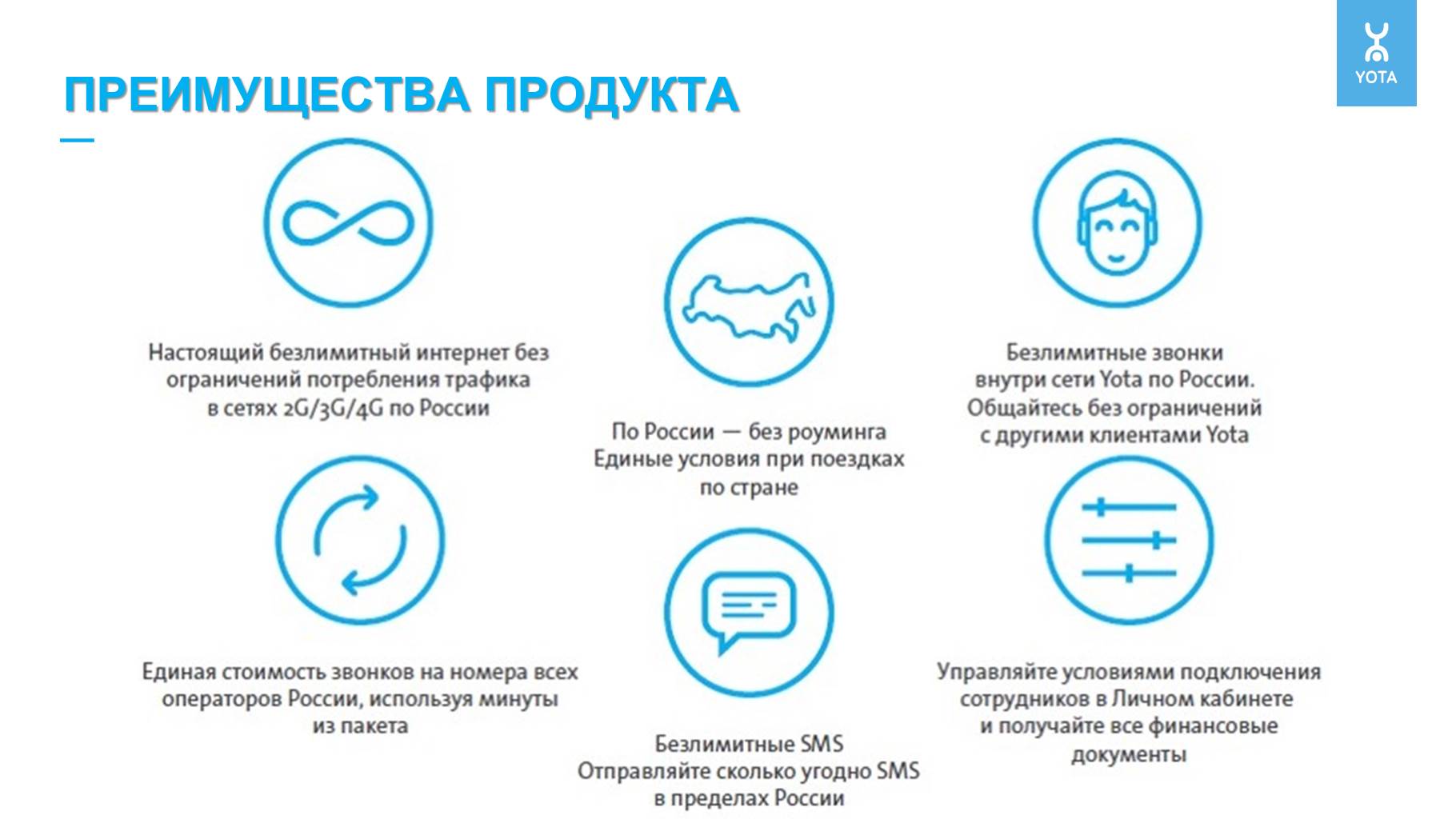

On tariffs for a smartphone, traffic is consistently high. Tablet pricing is offered for 3 speeds:
- 510 kbps;
- 2.1 Mbps;
- for the maximum (reaching 20 Mbps).
Tariffs for tablet and smartphone Internet have become Yota's main advantage over other service providers. It should also be said that there is no billing for on-net calls, it is possible to add free SMS messages. For different smartphone rates, a certain number of free minutes are offered for calls to numbers of other Russian operators. In short, the provider offers one smartphone tariff with high-speed unlimited Internet, and the buyer adjusts the rate for himself, supplementing it with the necessary services.
Of course, Iota has a tariff list for connecting to home PCs. There are many tariffs, their price is determined by the traffic speed.
How to strengthen the Yota modem signal if the Internet does not work well
These complexes consist of a modem/router and an antenna. They are a versatile device. It should be purchased if the signal strength of a regular modem is definitely not enough for comfortable work with Yota.
It is a device in the form of a block with connectors. Usually connected via USB to a computer or other device.
There are models of external units with two antennas that are connected via LAN to a router or a computer network card. These devices do not require a separate power supply, since the PoE interface provides simultaneous transportation of both the signal and the supply current over a twisted pair cable. Moreover, it is permissible to use a wire up to 100 m long. Such solutions, although not the most budgetary, are quite effective and reliable. The only downside is their high cost.
A situation may arise when there is no heavy load on the network, and the Yota modem is still heating up. To better understand, let's use an analogy.
If we imagine all signal-transmitting cables, pigtails, soldering points as interconnected water pipes, then signal consistency is the maximum correspondence of the internal diameters of these pipes. The greater this correspondence of diameters, the more efficiently the signal-water flows, the less losses to overcome obstacles.
Considering that the real signal does not flow, but pulsates (when downloading, for example, the incoming stream is greater than the outgoing one), then in case of mismatch (conditionally - with different pipe diameters), part of the energy that did not reach the antenna returns back, involuntarily heating the parts modem.
Of course, it is impossible to achieve the perfect layout, but it is necessary to strive for this when assembling.
As a result, it is worth noting that when choosing an antenna for Yota, you first need to analyze where the nearest operator tower is located, at what height, whether it is possible to install a signal receiver outside the house / apartment, in which direction you need to catch the signal.
It may be worth looking at various forums on the Internet if there are people who have encountered problems finding a signal in your city, how they solved (did not solve) the problem; ask a question to Yota technical support, perhaps new transmitters will be placed in the near future.

If the Yota transmitting station is nearby, and the signal is still bad, there is a possibility that the problems lie either in the location of the modem, in the presence of any strong interference near the house, or possibly in the wrong configuration of the router / modem or too high network load. For example, there are too many devices claiming one Internet connection.
Perhaps the router or firewall is not configured correctly, you need to diagnose networks using the appropriate software, you can try to completely disable the firewall and see if the signal is better. If there are any computer malfunctions (which rarely happens), you should try connecting another computer or laptop to the Yota network.
Ideally, the search for errors should be carried out from simple to complex. And if there is no desire to independently search for faults and upgrade the complex for receiving a signal, then you should contact the appropriate companies, whose specialists will do all the necessary work at the exit to your home or office. This will save both time and money.
The same USB modems, but with a WiFi network function. They replace the router, i.e.To distribute the Internet, such a modem is not connected to a router, but simply to any 5V USB power supply, incl. the USB socket of the car radio will fit.
Tariff for tablets
If unlimited Internet for a smartphone from Yota does not work, then it remains for tablets. It is represented by a single, but regulated tariff. Actually, apart from access to the network, it does not include anything - there are no packages of minutes and SMS. But on tablets, they are often not needed, mobile voice communication is expensive here (3.9 rubles / min.). But on the tariff for a tablet, you can optimize costs:



- 50 rubles - unlimited for one day;
- 590 rubles - unlimited for a month;
- 4500 rubles - unlimited for a year.
Thus, we have a favorable tariff for the Internet - you can download large files on your tablet, watch HD-video and enjoy high-speed surfing without bothering yourself with tedious calculations of the remaining traffic. Together with unlimited Internet, we rid ourselves of Iota speed limits and use network access to the fullest.
The disadvantages of the tariff are a possible decrease in speed at high load, there is a restriction on downloading torrents.
Unlimited Internet Yota for smartphones
Iota does not have a large number of tariffs, like MTS, Beeline or MegaFon. The operator provides subscribers with only three tariffs (for a smartphone, tablet and computer), however, they provide for the possibility of flexible settings.
The tariff for smartphones from Yota does not have specific conditions. The subscriber can determine the volume of the package of outgoing minutes and the amount of the monthly fee. The more services a tariff plan includes, the more expensive it will cost. For example, the cheapest version of the tariff will cost 440 rubles per month, and the most expensive 1890 rubles (prices are lower in most regions).You have the opportunity to choose the number of minutes you need for calls to numbers of other Russian operators (300, 500, 1000, 2000, 3000), as well as connect unlimited SMS for 50 rubles. per month or refuse this service. Other conditions cannot be changed.
Yota tariff for smartphones includes:
- Unlimited mobile Internet (there are restrictions, see below);
- Unlimited calls within the Iota network throughout Russia;
- Unlimited SMS to all numbers (for an additional fee of 50 rubles per month);
- A package of minutes for calls to numbers of other operators (it is determined by the subscriber independently).
As you can see, the tariff plan provides for very good conditions. If you are only interested in unlimited Internet Yota, then you can set the minimum price of 440 rubles per month. At first glance, everything is perfect, but do not forget that we are talking about cellular services, which means that there were some pitfalls. The Iota tariff for smartphones provides for a number of features, many of which can be attributed to disadvantages.
Tariff features:
- Unlimited Internet Yota is intended only for a smartphone / phone. If the SIM card is used in a modem, router or tablet, the internet speed will be limited to 64 Kbps.
- There is a restriction on the use of a smartphone as a modem or WI-FI access point (speed is limited to 128 Kbps).
- When using file-sharing networks, the speed is limited to 32 Kbps. That is, you will not be able to download even small files through torrent clients.
- Minutes from the package are used for outgoing calls to all mobile and landline numbers, including when traveling around the country.
- If the subscriber is in another region for a month, the operator will offer other conditions.Previously defined conditions for the home region will no longer be available.
Of course, the tariff also has other disadvantages. We have provided only the information that has official confirmation. If you believe the feedback from subscribers, then the tariff plan has other problems. However, Yota unlimited Internet is quite good for a smartphone and it is able to compete with the tariff and tariff, which are characterized by similar conditions.
Advantages and disadvantages of mobile access
It is convenient to use mobile Internet and access to it is available almost everywhere: in the city and in the countryside. Perhaps this was due to the installation of a large number of signal relay stations. When installing this method of connecting a house, all such advantages disappear, since you can safely wire high-speed Internet to an apartment or a private house and use it through a router.
Also, the limitation on data transfer becomes a negative point. This type of Internet is not intended for people who like to download games and large files. Iota, as a rule, does not have such a problem, since the provider provides unlimited access to the network, but, like all mobile providers, blocks the distribution of the network for devices that are not intended to be used by the purchased SIM card. Downloads from file hosting and torrents here are also usually very limited compared to regular cable Internet.



