- How to repair or change the plug on a network cable
- What is twisted pair
- Species and types
- Choice of category and containment
- Number of pairs
- Wire selection and standards
- Crimping the network cable
- Internet cable crimping methods
- Direct connection
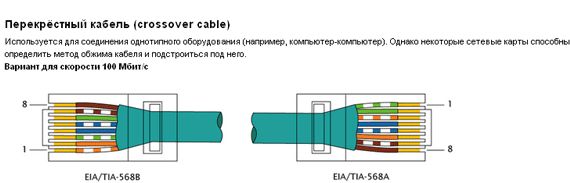
- Cross connection
- How to crimp a twisted pair cable (Internet cable pinout)
- Pinout color schemes
- Crimping instructions
- Screwdriver crimping instructions
- Video: how to compress a twisted pair with a screwdriver - a visual instruction
- Crimping a four-wire twisted pair
- Examination
- Crimping cable with direct connection
- RJ-45 connector crimp
- Internet cable connection scheme by color
- Crimping a twisted pair in a connector
- Video lesson: crimping the RJ-45 connector with pliers and a screwdriver
- How to properly compress an 8-core Internet cable
- Procedure
- Crimping a twisted pair without a tool (crimper)
- What to do if the network cable does not work?
- Cable termination twisted pair for crimping
How to repair or change the plug on a network cable
It also happens that you have to replace the plug on the cable and repair it. You can use a screwdriver. It’s worth saying right away that with poor-quality crimping, failures and loss of signal, disconnection will occur regularly. You can do the installation as follows:
- Remove the cable insulation and unwind all the cores inside it;
- Measure the distance along the entire body of the plug so that the wires reach the contacts, and the outer layer of insulation ends in the connector itself for greater reliability;
- Install the cable and fix all the veins along the contact channels;
- Clamp the fixation and “drown” the plug contacts into the veins.
- Check the cable for functionality.
 Pressing the plug with a special tool
How to check the Internet cable for serviceability If the cable suddenly stopped working, then you need to deal with the causes of this malfunction. There are not many options here:
- The cable strands do not touch the pins in the plug;
- The plug does not make good contact with the network card slot;
- An internal cable break has occurred.
The second reason is not necessary to consider for a long time, since it is not related to a cable malfunction. The first and third cases are of much greater interest. The most important check is with a multimeter or tester, that is, ringing. You can also call each individual posting. This is done in the following way. One probe of the device is installed on one part of the cable, and the other on - on the second. Alternately, voltage is applied to each vein. The malfunction, if it consisted in a gap, will be immediately found. If everything is fine with the cable, then, most likely, the contacts in the plug itself have come off. You can assemble it again or buy a new one and clamp it using any of the methods described above.
 Advanced crimping pliers
Now it’s clear how to connect the Internet cable correctly, how to fix it in the connector plug. It is quite simple to do this, using not even special devices, but simple pliers or a screwdriver. It is better to repair problem wires using a multimeter.
What is twisted pair
Twisted pair is a special cable that consists of one or more pairs of copper wires in a protective sheath, twisted together with a certain pitch. If there are several pairs in the cable, their twist pitch is different. This reduces the influence of the conductors on each other. Twisted pair is used to create data networks (Internet). The cable is connected to devices through special connectors that are inserted into standardized equipment connectors.
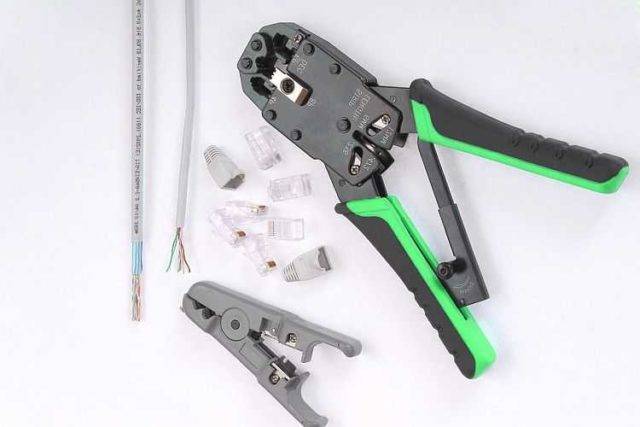
A set of tools used by professionals
Species and types
Twisted pair may or may not be secure. The shielded pair has aluminum foil or braid shields. Protection can be general - for the cable - and pairwise - for each pair separately. For laying indoors, you can take an unshielded cable (UTP marking) or with a common foil shield (FTP). For laying on the street, it is better to take with an additional metal braid (SFTP). If a twisted pair runs in parallel with electrical cables along the route, it makes sense to take a cable with protection for each pair (STP and S / STP). Due to the double screen, the length of such a cable can be more than 100 m.
Twisted pair - cable used to connect wired internet
There is also a twisted pair stranded and single-core. Single-core wires bend worse, but have better characteristics (the signal can be transmitted over long distances) and tolerate crimping better. They are used when connecting Internet outlets. In this case, the cable is fixed during installation and then hardly bends.
A stranded twisted pair bends well, but it has greater attenuation (the signal passes worse), it is easier to cut it during crimping, and it is more difficult to insert it into the connector.It is used where flexibility is important - from an Internet outlet to a terminal device (computer, laptop, router).
Choice of category and containment
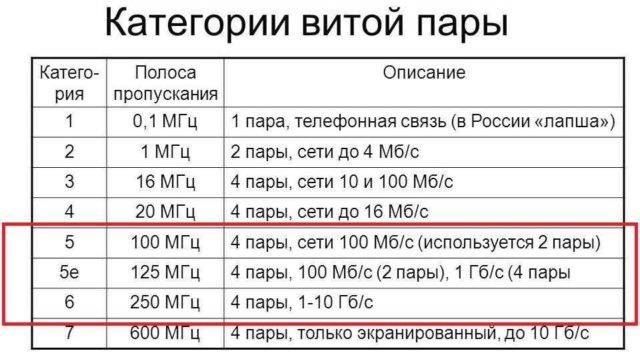
And a little more about categories. To connect to the Internet, you need a twisted pair cable of at least CAT5 category (you can use CAT6 and CAT6a). These category designations are embossed on the protective sheath.
to conduct the Internet, you need to buy a twisted pair cable of certain categories
And a few words about the color of the protective sheath and the shape of the cable. The most common is a gray twisted pair, but there is also an orange (bright red) twisted pair. The first type is ordinary, the second is in a shell that does not support combustion. It makes sense to use a non-combustible twisted pair cable in wooden houses (just in case), but there is no particular need for this.
The shape of a twisted pair can be round or flat. Round twisted pair is used almost everywhere, and flat twisted pair is needed only when laying on the floor. Although no one bothers you to put it under the plinth or in a special plinth with a cable channel.
Number of pairs
Basically, twisted pair is produced from 2 pairs (4 wires) and 4 pairs (8 wires). By modern standards, at speeds up to 100 Mb / s, two-pair cables (four wires) can be used. At speeds from 100 Mb/s to 1 Gb/s, 4 pairs (eight wires) are needed.
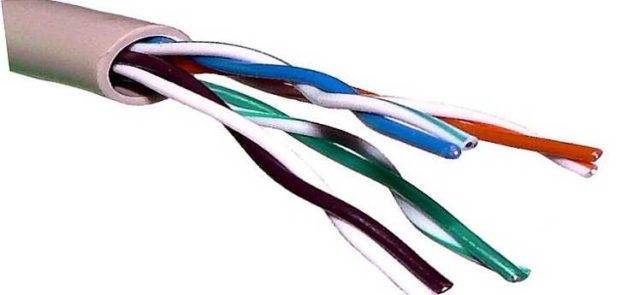
It’s better to immediately take a cable for 8 wires ... so as not to have to pull
Currently, the data transfer rate for an Internet connection for private houses and apartments does not exceed 100 Mb / s, that is, you can take a twisted pair of 4 wires. But the situation is changing so quickly that there is no guarantee that in a few years the threshold of 100 Mb / s will be exceeded, which means that the cable will have to be pulled. Actually, already now there are tariffs with a speed of 120 Mbps and higher.So it's better to pull 8 wires at once.
Wire selection and standards
In the last section, I mentioned the categories of twisted pair, here we will consider this point in a little more detail. After all, the anatomy and the speed of transmission on the cord also depend on the category.
I recommended you to take category 5, but 6th (CAT5, CAT6) is also suitable. All options are shown in the following table:
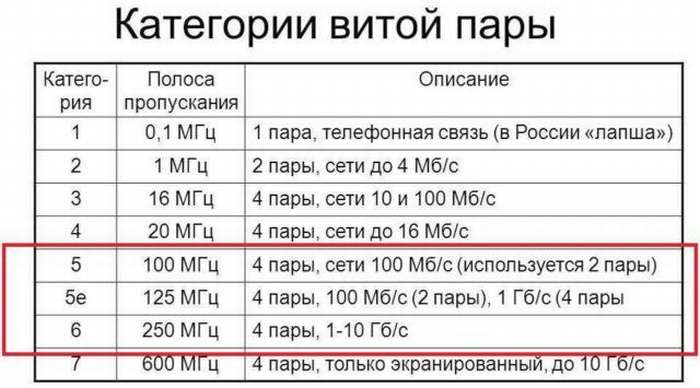
It will be important here to choose a cable for the desired speed. And it also depends on the number of wires inside
It usually goes like this:
- 2 pairs (4 wires) - up to 100 Mbps
- 4 pairs (8 wires) - from 100 Mbps
Usually, the ISP's technology limits you to 100 Mbps for the internet. But soon this threshold will be passed. Why am I - usually there will be exactly 2 pairs on the Internet cable, but on home ones (from the router to the computer) there are already 4 pairs.
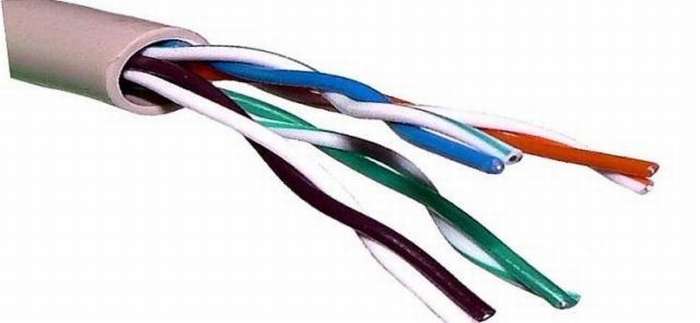 4 pairs or 8 wires
Crimping the network cable
There is one more nuance, we need to decide which of the two options we will crimp the cable.
Straight
- such a cable is suitable for connecting a computer to a router, for a regular Internet cable, etc. We can say that this is a standard.


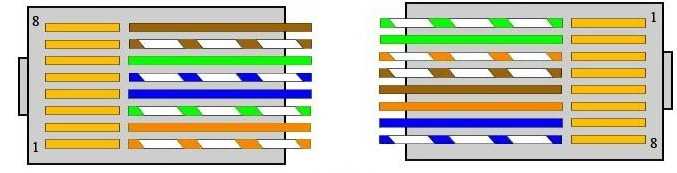
Get to the point.
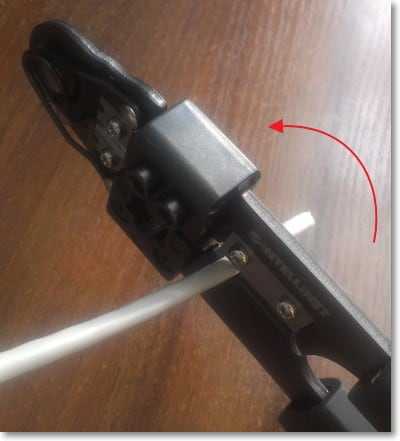
We take the cable and remove the top insulation. Just stepping back from the beginning of the cable about two centimeters, we make an incision in the upper insulation, in a tool like mine, there is a special hole into which we insert the cable and simply scroll the crimper around the cable. Then we remove the white insulation by simply pulling it off the cable.
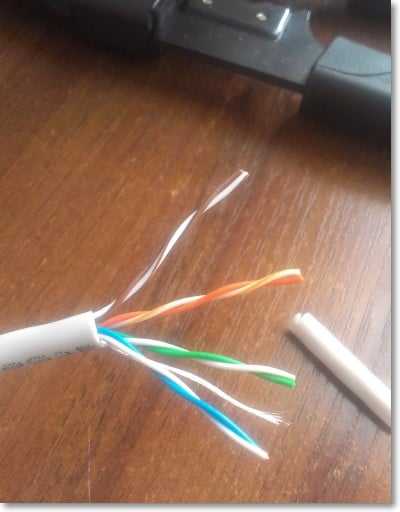
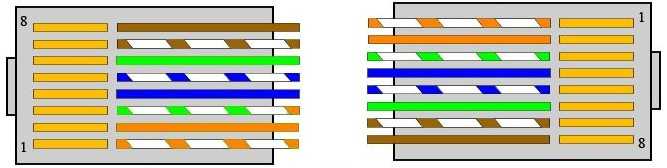
Now we unwind all the wires so that they are one at a time. We clamp them with our fingers and set them in the order we need, depending on which cable you are crimping. See diagrams above.
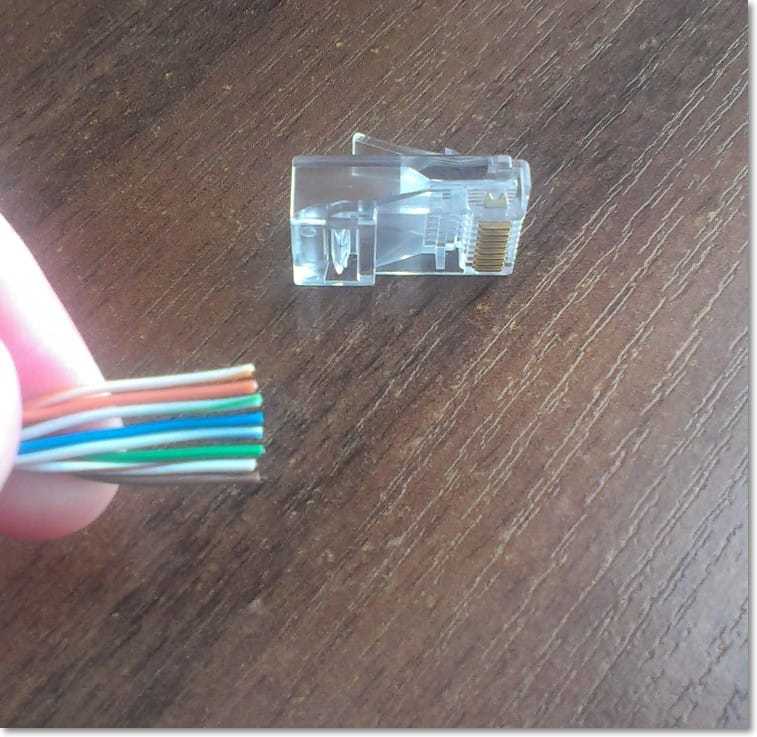
When all the veins are set correctly, they can still be cut off a little if they turned out to be very long, and it will not hurt to align them. So when everything is ready, we very carefully and slowly begin to insert these cores into the connector. Make sure that the wires enter the connector correctly, each into its own hole. Once the cable has been inserted into the connector, check again for proper core placement, then insert the connector into the crimper and squeeze the handles.
If your cables lie haphazardly near the computer, or you accidentally stretched or broke the network cable from the Internet, then you need to decide how to compress the RJ-45 network cable. You can compress a cable in different ways, so I will tell you how to compress a twisted pair cable correctly. And also consider the option if there are no special tools at hand. I chose this topic because computer networks are my profession and I have to work with network cables on a daily basis. First, let's find out what a network cable is.
A network cable is a conductor that includes eight copper wires (cores). These wires are twisted with each other, which is why this wire is often called a twisted pair.
So, let's say we want to connect our computer to the Internet. To do this, we need a line drawn to the modem - a patch cord, a computer and a modem.
So, before you learn how to crimp a network cable, let's go through the list of tools that we need for this:
1.Twisted pair cable (1.5 meters is usually enough);
2. Side cutters or scalpel;
3. RJ-45 connectors and caps;
4. Tool for crimping (Crimper);
5. LAN - tester;
6. As well as a sober head and straight arms: oops:.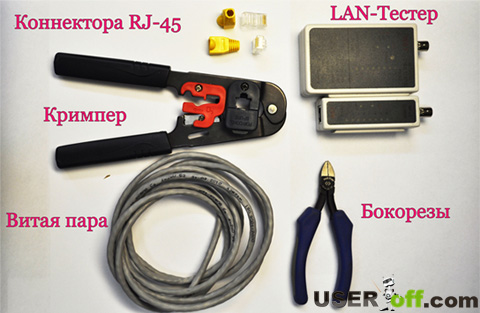 First of all, it will be necessary to remove the top layer of insulation from both ends of the twisted pair. The insulation can be removed using tweezers or a knife, which is located on the crimping tool.
  You may be wondering, "How many millimeters of insulation should be removed from the ends of a twisted pair?" I will answer you that 15-20 mm will be enough. It should be noted that the removal of insulation must be carried out carefully, without damaging the insulation of the cores themselves.
After you have removed the insulation from the two ends of the twisted pair, you should unwind the cores and straighten all the wires according to the crimping diagram below.
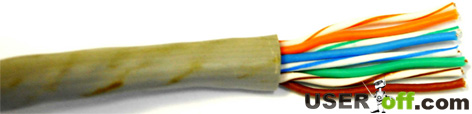 Further, it should be noted that the crimping of the cable can be carried out in two ways:
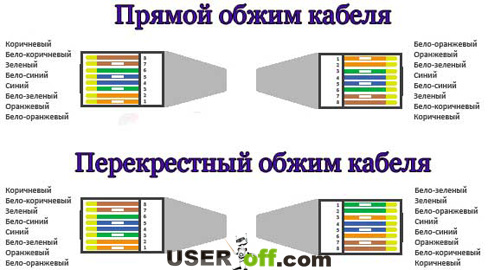 Straight crimp cable.
This method is suitable if you want to connect your computer to a local network or to the Internet.
Cross crimp cable.
This method is used if you want to connect two computers together.
Internet cable crimping methods
The cord is crimped in order to enter the network card connector or socket and be fixed there with all the contacts. All 8 pins of a 4-wire twisted-pair cable and the outer sheath are made in the form of a dense cord, which initially does not contain any connectors. This is done so that the wire does not cling to other things during storage and transportation. It also allows him to crawl into small holes in the walls when laying in an apartment. If the crimping was carried out at the cable manufacturer, the pulling would take more time and would require more resources.
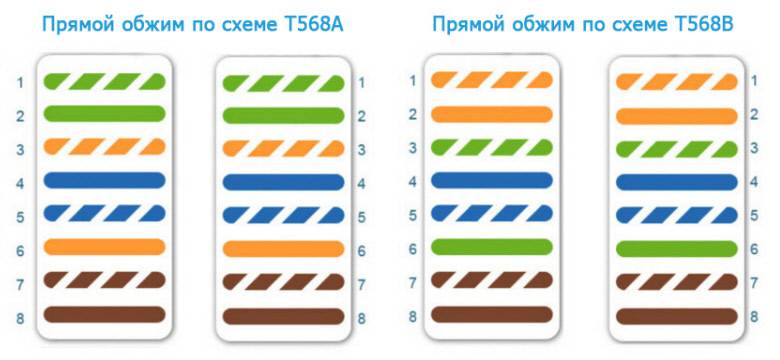 Straight crimping methods
Direct connection
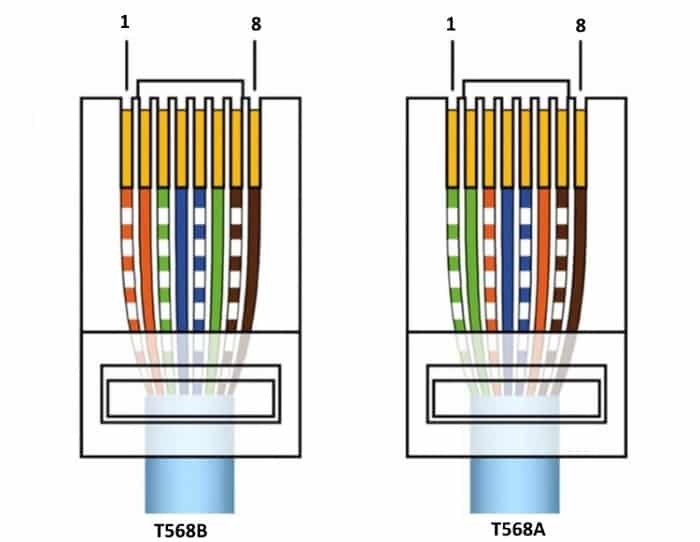
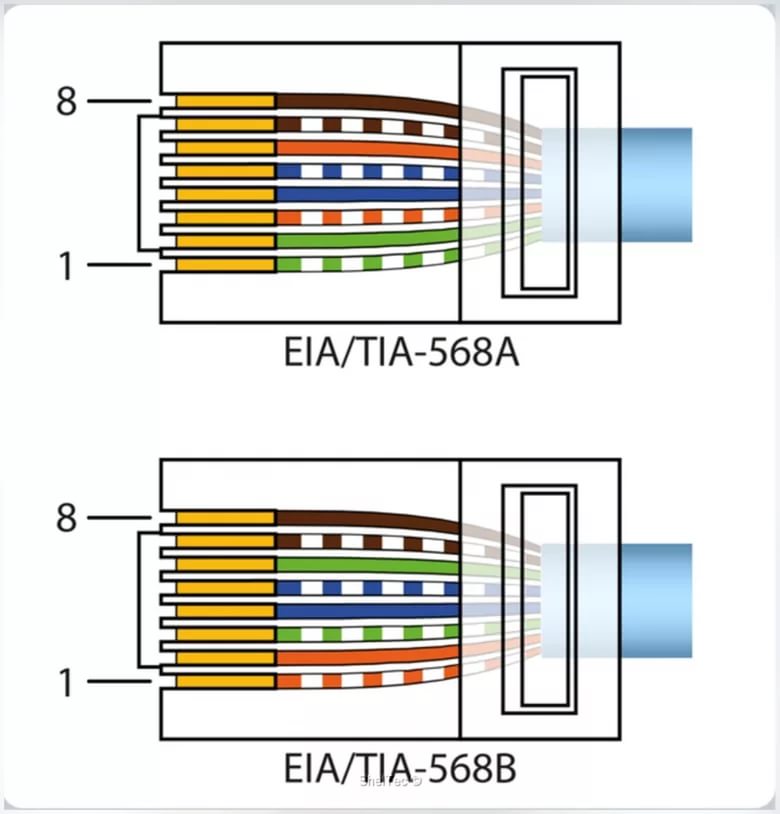
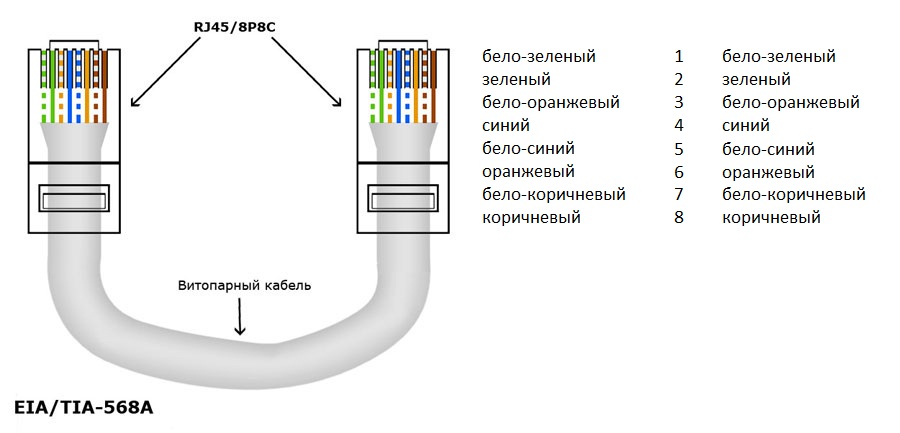
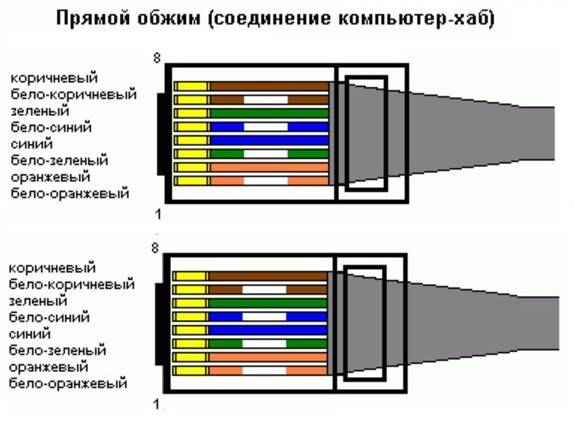
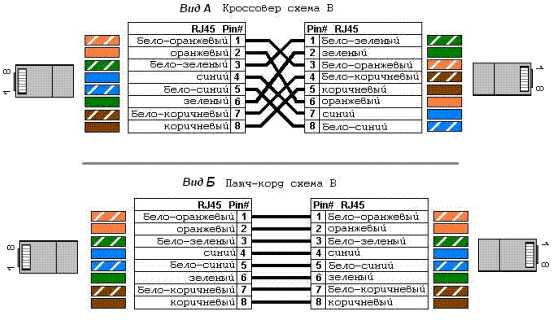
A direct connection wire is often referred to as a patch cable and is required to replace a wireless connection.Its main feature is that the wire contacts on one side of it completely correspond to the contacts on the other. In this case, one standard is used: either T568A or T568B.
It is used to connect:
- Switch and router;
- Computer and switch;
- Computer and hub.
Schematic example of a cross connection
Cross connection
The cross type is used to directly connect two computers. Its main difference from a straight cable is that it uses different standards for the arrangement of contact groups. It can use T568A on one end and T568B on the other. Most often it is used to combine devices of the same type, namely:
- Switch and switch;
- Switch and hub;
- two routers;
- two computers;
- computer and router.
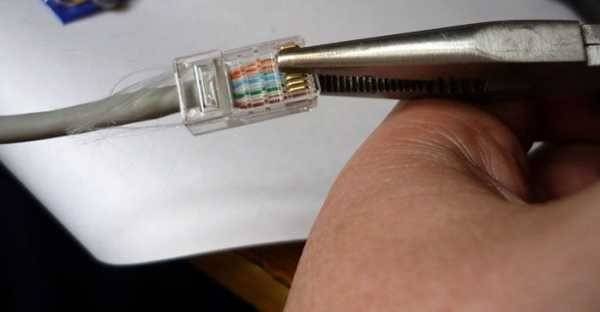 Crimping the wire with long nose pliers
How to crimp a twisted pair cable (Internet cable pinout)
For crimping twisted pair are used:
-
connectors - transparent plastic RJ45 adapters that allow you to insert the cable into the computer;
-
crimping pliers, also called a crimper - a tool with blades for stripping insulation and sockets to ensure good contact with the conductor.
Pinout color schemes
There are two main schemes by which twisted pair can be compressed: straight and cross.
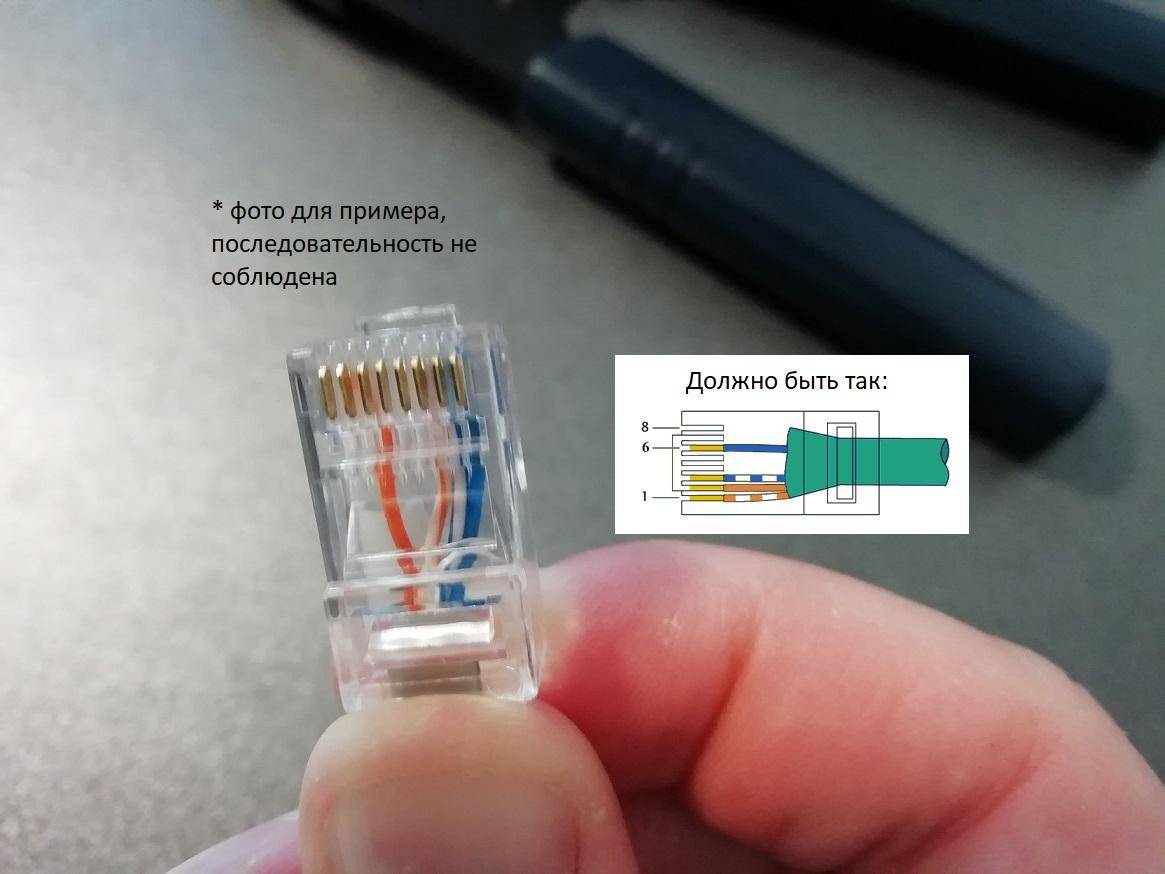
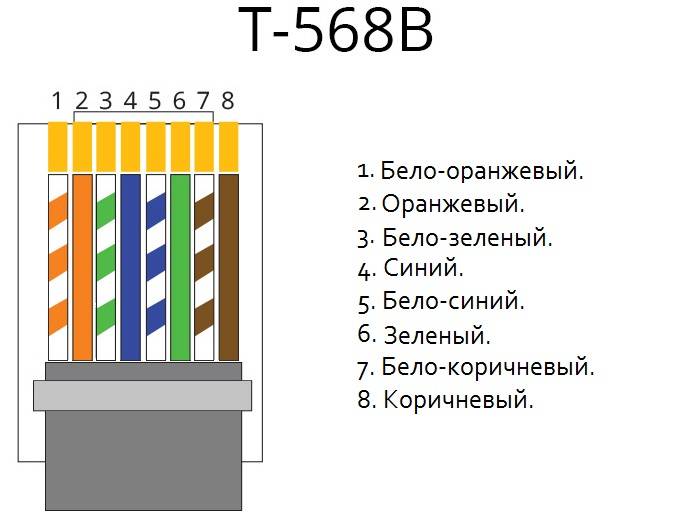
They differ from each other in the way the cable cores are arranged (pinout color scheme). In the first case, at both ends of the wire, the cores are arranged in the same sequence:
- white-orange;
- Orange;
- white-green;
- blue;
- white-blue;
- green;
- white-brown;
-
brown.
This method is used most often, for example, when you need to crimp a cable to connect devices of different purposes (computer, laptop, TV, etc.) with a router or modem.



If it is necessary to cross-pinout, the cable cores in the first connector have the same sequence as in the previous case, and on the second they are arranged according to the following color scheme:
- white-green;
- green;
- white-orange;
- blue;
- white-blue;
- Orange;
- white-brown;
-
brown.
Cross crimping is used when connecting devices of the same purpose, for example, two computers or routers. But today it is almost never used, since modern network cards and routers can automatically detect the cable crimping scheme and adapt to it.
Crimping instructions
Compressing a twisted pair is quite easy:
- Prepare the cable, RJ45 connector and crimping tool.
-
Release the cable from the outer winding approximately 2-3 centimeters from the edge. To do this, you can use the crimper: it provides special knives.
-
Unwind and align twisted-pair pair wiring. Arrange them in the correct sequence according to the selected crimping pattern. Attach the cable to the connector and cut off the excess. Open wires must be left long enough for the sheathed cable to enter the bottom of the connector.
-
Trim excessively long wires with a crimper.
-
Insert all the wires of the cable into the connector to the very end.
-
Crimp the twisted pair cable with a crimper. To do this, insert the connector into its socket until it clicks and squeeze the tool handles several times.
I have crimped twisted-pair cables at home and at work more than once.It is very easy to do this with a special tool, the main thing is to correctly arrange the wires by color. But you need to carefully cut the outer sheath of the cable with a crimper. My experience shows that if you apply extra effort, then not only the outer insulation is cut, but also the inner cores.
After the twisted pair is crimped, the outer winding should partially enter the connector. If the cable cores peek out of the connector, then the crimping must be done again.
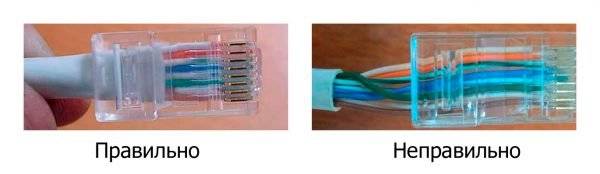
The outer sheath of the cable must partially fit into the connector
Screwdriver crimping instructions
You can compress the cable not only with a special tool, but also with an ordinary screwdriver. This method is more time consuming, and the probability of a poor-quality result is higher. But it will be the only possible one for those who do not have a crimper at hand. To complete the work you will need:
- twisted pair;
- RJ45 connector;
- winding stripping knife;
- wire cutters to trim the wires;
-
flat screwdriver.
Crimp the cable as follows:
- Prepare the twisted pair in the same way as for crimping with a crimping plier.
- Insert the conductors into the socket.
-
Using a screwdriver, press each connector blade in turn so that it cuts through the winding of the cable core and comes into contact with the copper conductor.
- Check the result.
Video: how to compress a twisted pair with a screwdriver - a visual instruction
Crimping a four-wire twisted pair
In addition to the eight-wire twisted pair, there is also a four-wire. It is used less often because it provides a data transfer rate of no more than 100 Mbps (on a standard cable, the speed can reach 1000 Mbps). But such a cable is cheaper, so it is actively used in small networks with small and medium volumes of information.
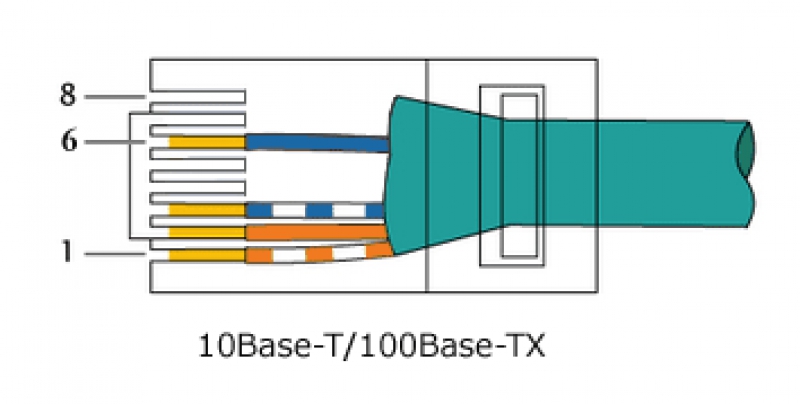
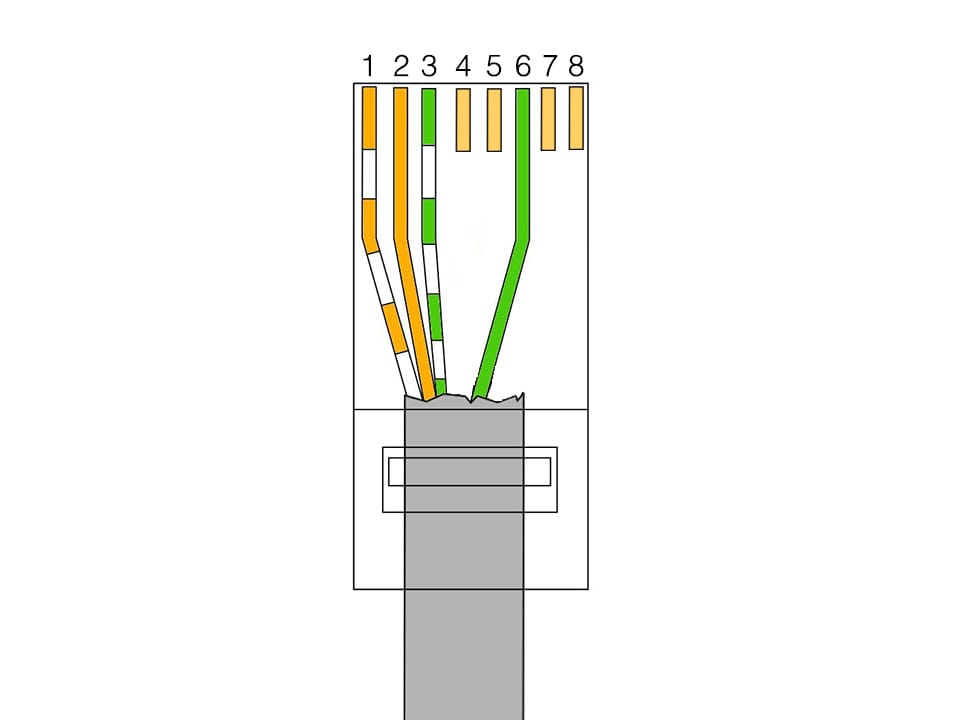
The process of crimping a four-wire twisted pair is the same as for an eight-wire twisted pair: the same connectors and crimping pliers are used. But at the same time, only a part of the contacts is used in the connector, namely 1, 2, 3 and 6, and the rest remain empty.
Color designations of conductors in a four-wire twisted pair can be different, but two options are most common:
- White-orange, orange, white-blue, blue.
- White-orange, orange, white-green, green.
The first and second contacts are always inserted with white-orange and orange wires, respectively. And in the third and sixth there will be either blue or green wires.
Examination
After connecting the device to other devices or connecting to a local network, you need to check how the created line works. The easiest way is to connect the Ethernet connector to the PC and make sure everything works.
Professionals use cable testers or LAN testers. They include two blocks and allow you to perform diagnostics of a cable routed in different rooms. Both blocks have ports for installing connectors. After connection, the device starts up and checks each core, which is indicated by LEDs with serial numbers. If there is a break, then you can see where the damage is or poor-quality crimping.

At home, a multimeter is used instead of a tester. It is put on ringing or on a small resistance (200 ohms). After that, each wire of the same color is diagnosed on two adjacent connectors. Thin probes are needed to accurately touch the contacts. To do this, they need to sharpen or put wire tips.
It is also easy to check the cable with plugs in various rooms with a multimeter. In the ports of the connected devices there is an induction coil connecting the wires of one pair, so there is conductivity between them. It is necessary to insert a connector into the port of one of the turned off devices, and diagnose conductivity on the second connector. For private lines (up to 100 Mbps), only two pairs need to be ringed.
The resistance of the pairs, as a rule, is similar. If the difference is large or the value is very high, if the line cannot be ringed, this indicates an incorrectly performed wire crimp.
Crimping cable with direct connection
How to connect a printer to a computer on Windows 10 and Mac OS
So, let's take a closer look at how to compress an Internet cable correctly.
First you need to clean the wires from their external protection.
In almost all wires in which the wires are in the form of a twisted pair. There is also a special thread with which you can easily get rid of the first layer.
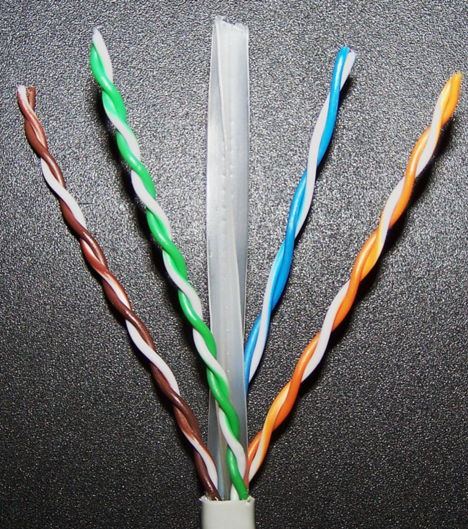
Twisted Pair Image
Next, you need to unwind and straighten the small wires.
Measure the required length for cutting (attach an adapter), taking into account that a small part of the external protection should go into the connector by a few millimeters.
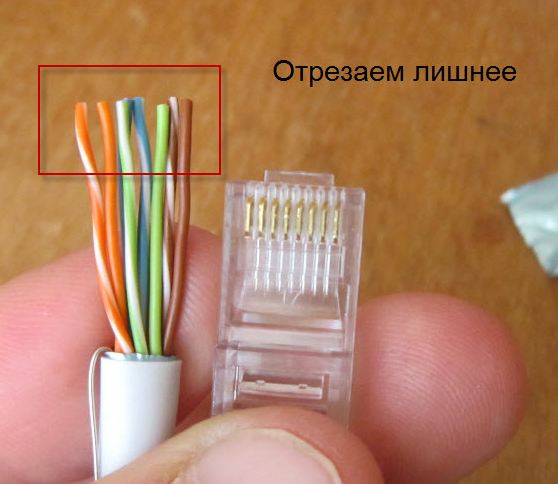
Cut off the excess, measuring the desired length
Inside the connector are divisions, separate for each dart.
They should carefully arrange the wiring.
You need to insert it so that the outer shell also goes under the adapter clamp.
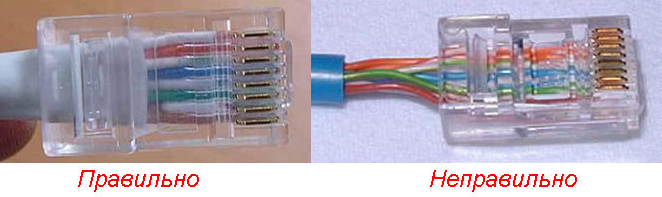
How to properly fix the wire
Using a screwdriver, you need to fix the connector where it comes into contact with the insulated part of the wire.
It is very important to keep track of the wiring, they must be in their place each. The next step is to fix them in the contacts of the adapter.The next step is to fix them in the contacts of the adapter
The next step is to fix them in the contacts of the adapter.
For this action, you will need a crimper.
With its use, the work will be done once and with high quality.
You can also crimp the cable without crimping, helping yourself with a screwdriver.
1Insert so that the outer shell also goes under the clamp of the adapter.
2 Conveniently place it on a table or other convenient place that will ensure that the object is firmly in contact with a smooth surface.
In this case, the clamp must be in a free position so as not to crush it during processing.
3 The force of pressure must be such that each wire correctly sits in its place and cuts through the insulation.
4Use a flat-sided screwdriver and gently press down on the connector until you can see any gaps or protrusions.

It is important to properly position the wires in the adapter
At the end of processing, it is required to check the performance of the product using a special device.
The tester must be configured before testing as follows: put the switch to diagnose resistance or set the sound signal to sound when the resistance changes.
You need to test for each wire separately.
If there are difficulties somewhere, and there is no indicator reaction, you need to tighten the idle wire and check again.
Next, you need to put the protection in place between the cord and the creeper.
Of course, you can save money and not buy such a tip.
But the savings will be minimal, and if the wire is damaged, you will need to do the work done again, or even buy other components if something becomes unusable.

Protects the wire from bending
This job is done.
The important thing is that the better the adapter is made and the cord is crimped, the better the Internet connection with your PC will be. If the Internet supply is intermittent, you should check the connector again
After all, in this case, over time, it can generally fail.
If the Internet connection is intermittent, you should check the connector again. After all, in this case, over time, it can generally fail.


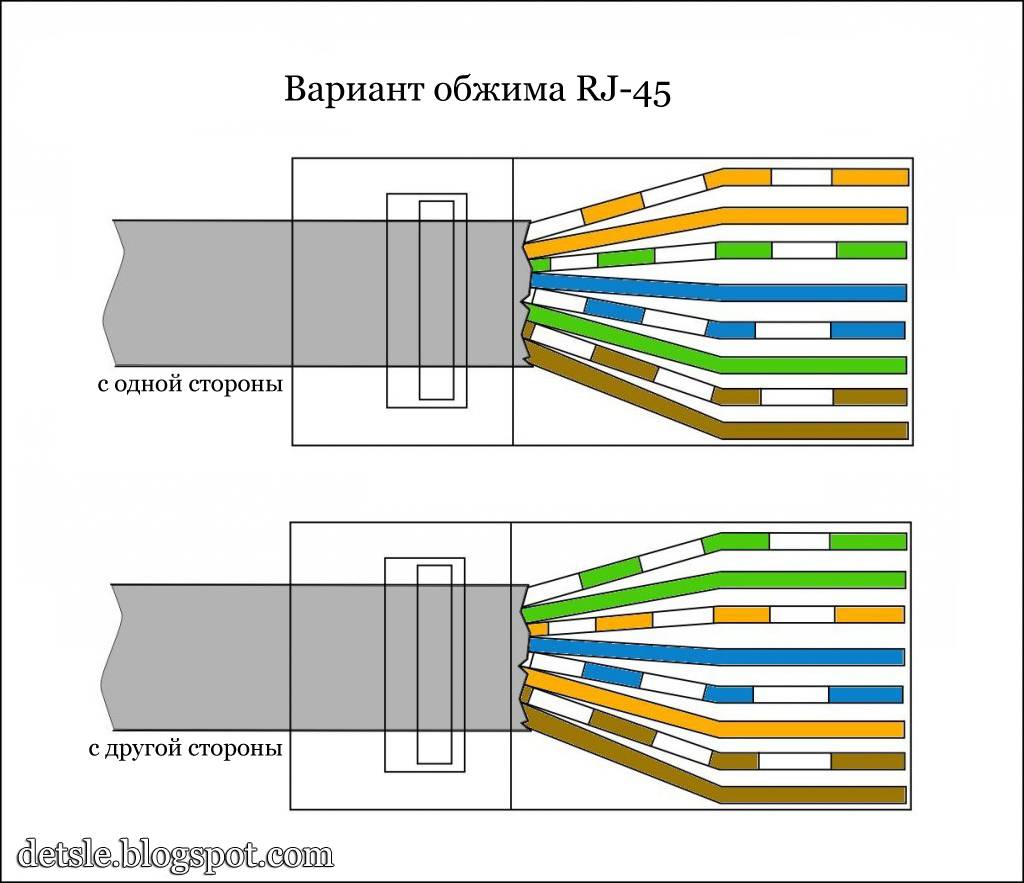
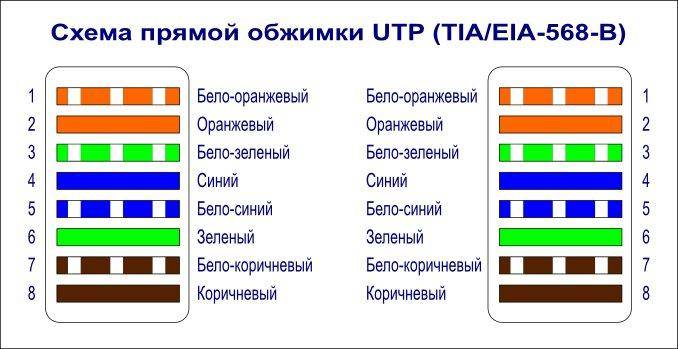


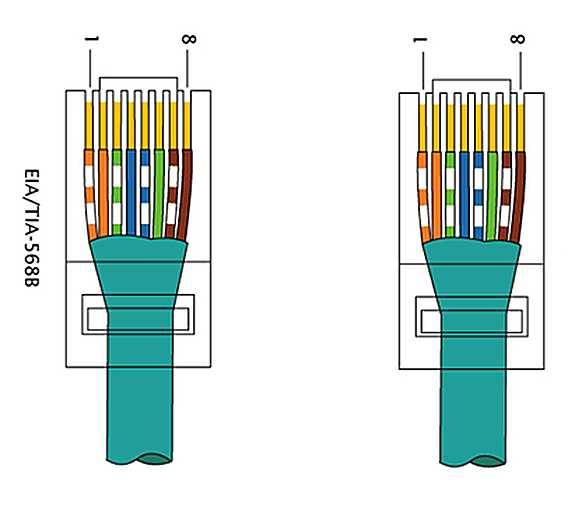
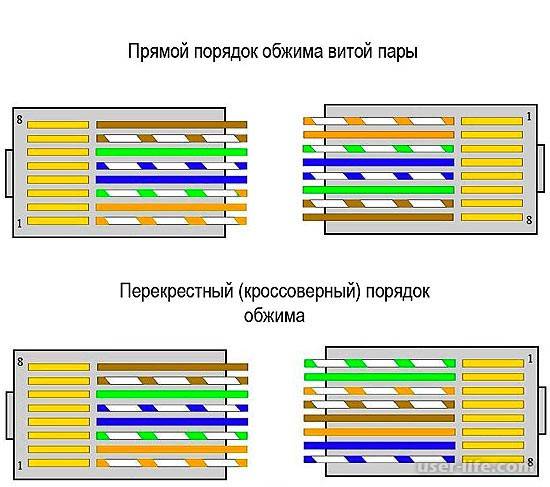
RJ-45 connector crimp
An Internet cable that enters an apartment or house, which is most often called a twisted pair cable, often ends in a small plastic connector. This plastic device is the connector, and usually RJ45. In professional jargon, they are also called "Jack".
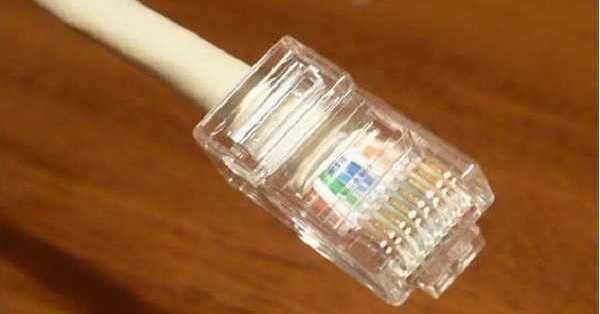
This is what an RJ-45 connector looks like
Its case is transparent, due to which the wires of different colors are visible. The same devices are used on connecting wires that connect computers to each other or to a modem. Only the order of location (or, as computer scientists say, pinouts) of wires can differ. The same connector is inserted into a computer outlet. If you understand how the wires are distributed in the connector, there will be no problems connecting an Internet outlet.
Internet cable connection scheme by color
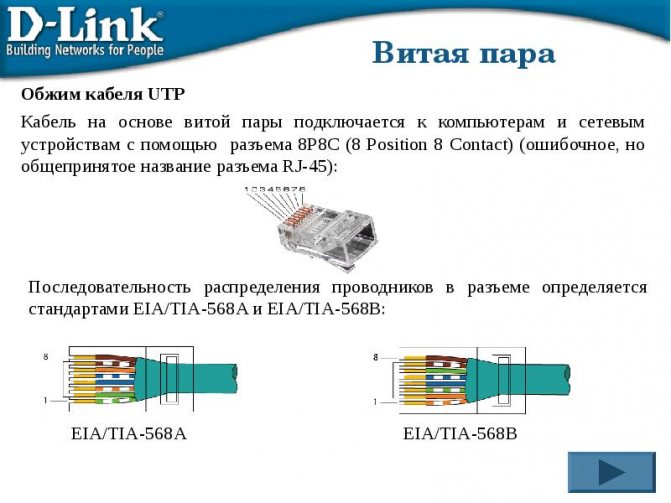
There are two connection schemes: T568A and T568B. The first option - "A" is practically not used in our country, and everywhere the wires are arranged according to the "B" scheme. It must be remembered, since it is it that is required in most cases.
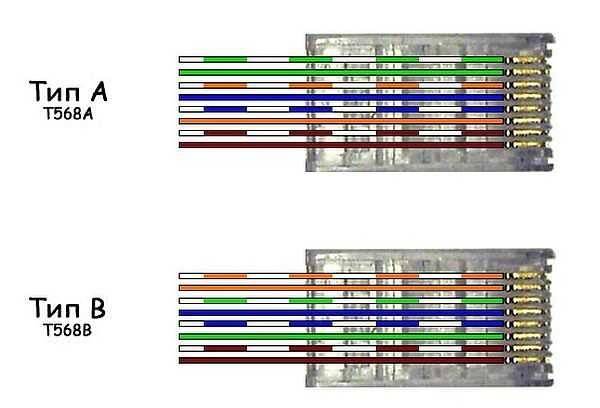
Internet cable connection diagrams by color (use option B)
To finally clarify all the issues, let's talk about the number of wires in a twisted pair. This internet cable comes in 2-pair and 4-pair.For data transfer at speeds up to 1 Gb / s, 2-pair cables are used, from 1 to 10 Gb / s - 4-pair. In apartments and private houses today, mainly, streams up to 100 Mb / s are brought. But with the current pace of development of Internet technology, it is quite possible that in a couple of years the speeds will be calculated in Megabits. It is for this reason that it is better to immediately expand the network of eight, and not of 4 conductors. Then when you change the speed you do not have to redo anything. It's just that the equipment will use more conductors. The difference in cable price is small, and sockets and Internet connectors still use eight-pin.
If the network is already wired two-pair, use the same connectors, only after the first three conductors laid according to scheme B, skip two contacts and lay the green conductor in place of the sixth (see photo).
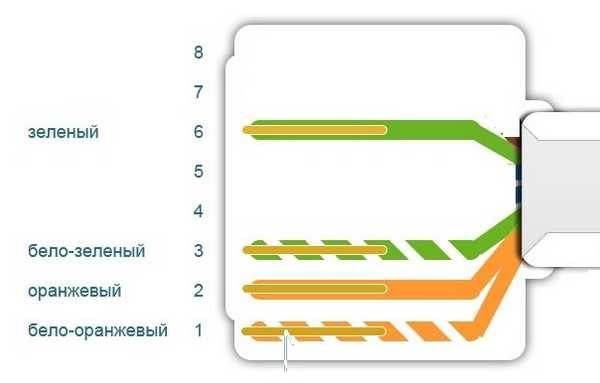
Scheme of connecting a 4-wire Internet cable by color
Crimping a twisted pair in a connector
There are special pliers for crimping wires in the connector. They cost about $6-10 depending on the manufacturer. It is more convenient to work with them, although you can get by with a regular screwdriver and wire cutters.
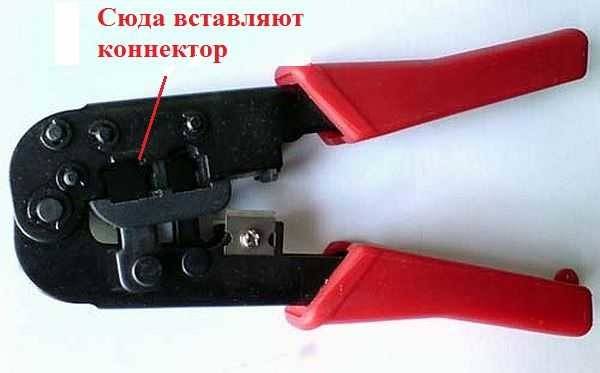
Pliers for crimping connectors (one of the options)
First, insulation is removed from the twisted pair. It is removed at a distance of 7-8 cm from the end of the cable. Under it there are four pairs of conductors of different colors, twisted in twos. Sometimes there is also a thin shielding wire, we simply bend it to the side - we do not need it. We unwind the pairs, align the wires, spreading them in different directions. Then fold according to the scheme "B".
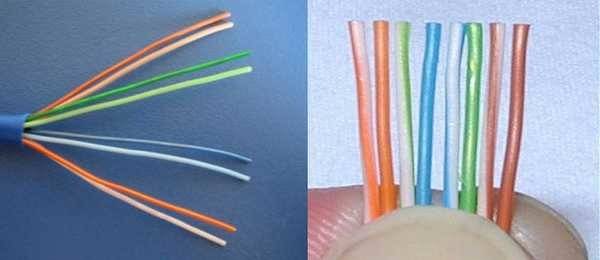
How to terminate an RJ-45 connector in a connector
We clamp the wires in the right order between the thumb and forefinger, lay out the wires evenly, tightly to each other.Having aligned everything, we take wire cutters and cut off the excess length of the wires laid out in order: 10-12 mm should remain. If you attach the connector as in the photo, the twisted pair insulation should start above the latch.
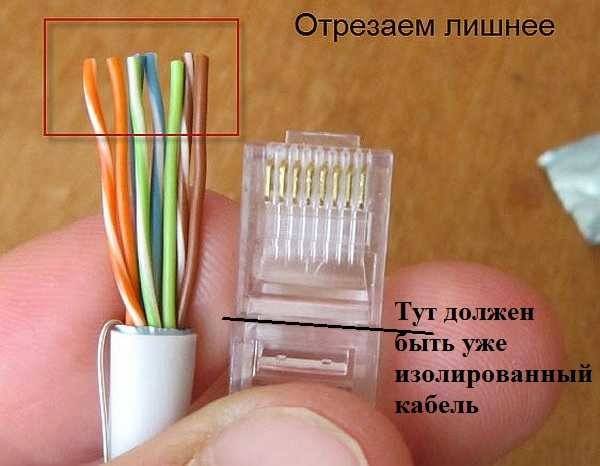
Cut off so that the wiring remains 10-12 mm
We put a twisted pair with cut wires into the connector
Please note that you need to take it with the latch (protrusion on the cover) down
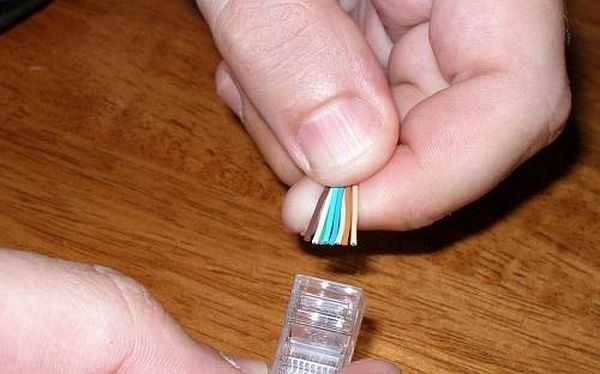
Putting the wires into the connector
Each conductor must get into a special track. Insert the wires all the way - they should reach the edge of the connector. Holding the cable at the edge of the connector, insert it into the pliers. The handles of the pliers are brought together smoothly. If the body has become normal, no special efforts are required. If you feel that it “does not work”, double-check whether the RJ45 is in the socket correctly. If everything is fine, try again.
When pressed, the protrusions in the tongs will move the conductors to the micro-knives, which will cut through the protective sheath and ensure contact.
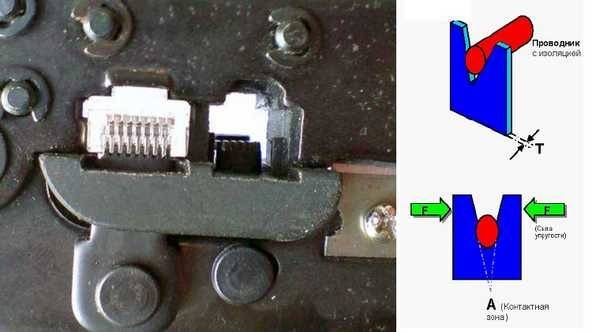
How crimping pliers work
Such a connection is reliable and problems with it rarely occur. And if something happens, it’s easy to remake the cable: cut off and repeat the process with another “jack”.
Video lesson: crimping the RJ-45 connector with pliers and a screwdriver
The procedure is simple and easy to repeat. It may be easier for you to do everything after the video. It shows how to work with pliers, as well as how to do without them, and do everything with a regular straight screwdriver.
How to properly compress an 8-core Internet cable
To prepare a twisted pair cable for operation, you need:
- the LAN cable itself, the length is determined according to needs, but not more than 55 m for categories 5 ... 5e;
- side cutters (they are wire cutters) or a sharp knife for cutting insulation and cutting the cable;
- RJ45 connectors and caps (the latter is not necessary, but significantly improves the quality of crimping the Internet cable);
- special pliers for crimping, they are called crimper. By the way, on a professional tool there is an analogue of side cutters for stripping the ends of the wire;
- LAN tester.
Procedure
-
After measuring the required length of the wire, the insulation is removed from the edges for a length of 10 ... 20 mm. This can be done with a knife - carefully walk around the circumference, cutting the insulation, and then pull off the cut protection with tweezers. If there is a special cutting thread in the twisted pair (it is usually white), you can pull it, cutting the protection along the cable to the desired length. After that, the unfolded fragment of insulation is cut off. If there is a special blade in the crimper (crimping pliers), it is better to strip the cable with it.
This is how the wire should look like after cutting off excess insulation and carefully trimming the ends of the pairs (this must be done to make it more convenient to insert the cores into the connector contacts). - Next, you need to determine the crimping scheme. It can be straight (both ends of the wire are connected to the connectors in the same way) or crossed (crossover, the two ends have different positions of the pairs in the connector). The direct type is used if you need to connect a device to a switch - for example, a laptop or computer, printer, TV with a router or hub. A crossover is used to connect two devices - for example, a laptop with a desktop computer.
Crimping an Internet cable 8 cores - diagram -
Separate the wires of the pairs, align them and cut the ends if necessary - all the wires must have the same length and be strictly parallel.
-
Insert the prepared wires into the connector contacts and crimp them with a crimper.
This is how (schematically) the cable looks after crimping.
Surely the user has a question - why were there caps in the list of necessary items and at what stage should they be used? They are put on the already cut, but with the insulation not yet removed, and slide over the already crimped connector.
The presence of such a cap prevents the wire from bending in a place where the insulation has already been removed, but there is no connector yet. Due to this, there is less risk of fracture of thin strands in this place, and a longer period of use of a twisted pair cable.



Interestingly, the cap also protects the connector latch (the bar that is pressed down to insert or remove the connector into the device) from accidental pressing.
Learn more about how to crimp an 8-core RJ45 cable in the tutorial video.
Crimping a twisted pair without a tool (crimper)
If you have everything you need, you can start making the cable. I will try to show everything as detailed and step by step as possible.
1

2(photo above)

3

4

We insert the wires to the stop. They should go completely, and rest against the front wall of the connector.
5 (maybe you have something else)

The contacts need to be pressed in hard. So that they break through the cable. The contact itself should not just line up with the connector body, but be slightly recessed into the body. The job is not the easiest. When I crimped the cable with a screwdriver, it was hardly inserted into the LAN port of the router (but it already worked), after which I still pressed the contacts with a screwdriver.
After I crimped each contact, I also snapped the cable retainer. It is simply pressed inward and we press the outer insulation.

All is ready. We do the same on the other side of the cable. I got it like this:

As you can see, the contacts themselves are slightly damaged by a screwdriver. When crimping with a crimper, there is no such damage.
I checked the cable by connecting the laptop to the router with it. The Internet appeared on the laptop, which means that everything turned out and works. I managed to make a network cable the first time. Even without a special tool, with a regular knife and a screwdriver. I hope you did the same.
What to do if the network cable does not work?
It may be like that. But I would not be in a hurry to immediately blame everything on the cable. It is possible that the problem is in the router, computer, or other device that you are connecting. Need to check.
- Connect another device using the provided cable. If possible, check the devices by connecting them with a different cable. To make sure that the problem is in the network cable that we just crimped.
- Be sure to carefully check the sequence of wires in the connector in accordance with the diagram.
- If you mixed up the sequence of wires, then bite off the connector and redo it.
- If everything is according to the diagram, then take a screwdriver and press the contacts on the connector. It is possible that there is no contact.
34
Sergey
Useful and interesting
Cable termination twisted pair for crimping
Cutting a twisted pair network cable for crimping is the first and most important step in crimping. The reliability of the connection of the conductors of the twisted-pair cable with the RJ45 plug, and, as a final result, the stability of access to the Internet, depends on the accuracy and correctness of its implementation.
The main thing when cutting is to prevent notching the conductors of twisted pairs and to exclude their overlap at the clamping point with a retainer in the RJ-45 plug.In crimping pliers for RJ-11, RJ-45 plugs, as a rule, there are special knives for cutting the twisted pair cable along the length and trimming its outer sheath. But I never use these functions of ticks, since I have repeatedly had to deal with the consequences of such pruning.
The fact is that a twisted-pair cable is far from an ideal circle, since all the pairs are twisted around each other, when cutting in pliers, the copper cores of the conductors are often notched and a few kinks are enough for them to break off. Reliability can only be guaranteed by manually preparing the end of the cable for crimping.
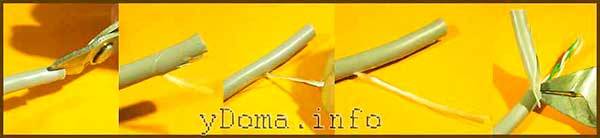
Cutting the network cable begins with the removal of the outer sheath. To do this, one sponge of the side cutters is inserted into the cable. It is necessary to ensure that conductors do not fall on the cutting edge. In most cables, a nylon cutting thread runs inside. After opening a couple of centimeters of the shell, you can take hold of it and cut the shell by 4-5 cm with an interference fit. Then the shell is bent to the side and cut off with side cutters. Many recommend stripping the jacket 14mm, but at this length it is almost impossible to develop and align the twisted-pair conductors well.
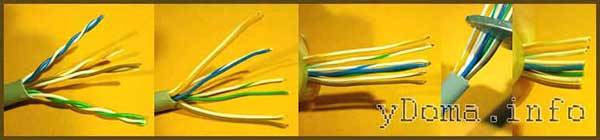
Next, the twisted pairs themselves develop counterclockwise, usually they are twisted clockwise, if you look at the end of the cable. It is necessary to develop them in such a way that the pairs are in the same plane to the depth of the shell up to 5-8 mm. This condition must be observed in order to prevent the conductors from being squeezed by the plug clamp when crimping with tongs. In this case, it is necessary to immediately orient the pairs by color, taking into account the color marking for crimping.
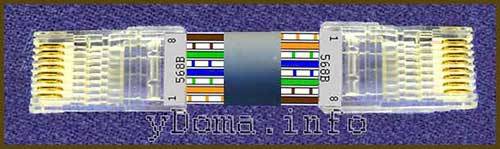
Twisted pair crimp color scheme Option B, the most common option.
The twisted-pair conductors are developed and straightened until they are in the same plane at the clamping point with the RJ plug retainer. The twisted pair conductors are shortened to a length of 14 mm, inserted into the RJ-11, RJ-45 plug. Be sure to check that all conductors are under the teeth of the contacts and their alternation matches the color marking. Sometimes at the time of filling the wires into the plug, they change places. Conductors in color scheme B are located through one, white with colored stripes - colored. This allows you to quickly check that the wiring is correct at a glance.