
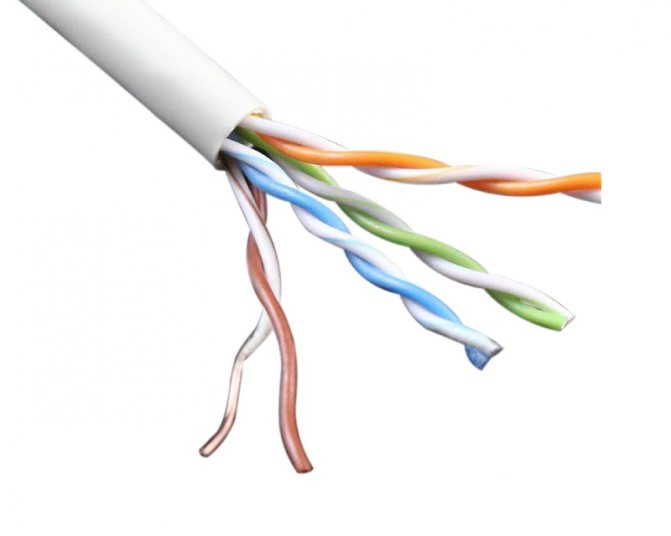
- Crimping scheme
- Crossover cable
- coaxial wire
- What equipment to buy for a home fiber optic network
- Standard crimp patterns
- Option #1 - straight 8-wire cable
- Option #2 - 8-wire crossover
- Option #3 - straight 4-wire cable
- Option #4 - 4-wire crossover
- Cable Selection Criteria
- Criterion #1 - Internet cable category
- Criterion #2 - type of cable core
- Criterion #3 - cable shield
- Marking
- So what is better - optics or copper twisted pair
- Fiber optic connection
- Internet connection using fiber optics
- High tech economy
Crimping scheme
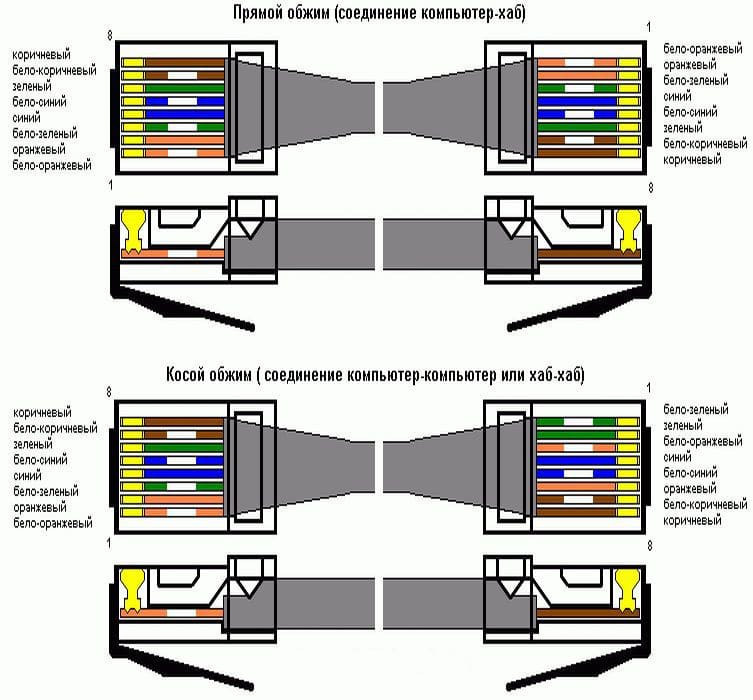
There are two types of cable crimping using the 8P8C connector:
Direct - Provides direct communication between the equipment and the switch/hub
Cross - involves the connection of several network cards of computers, i.e. computer-to-computer connection. To make this connection, you need to create a crossover cable. In addition to connecting network cards, it is used to connect older types of switches / hubs. If the network card has the appropriate function, then it can automatically adapt to the type of crimp.
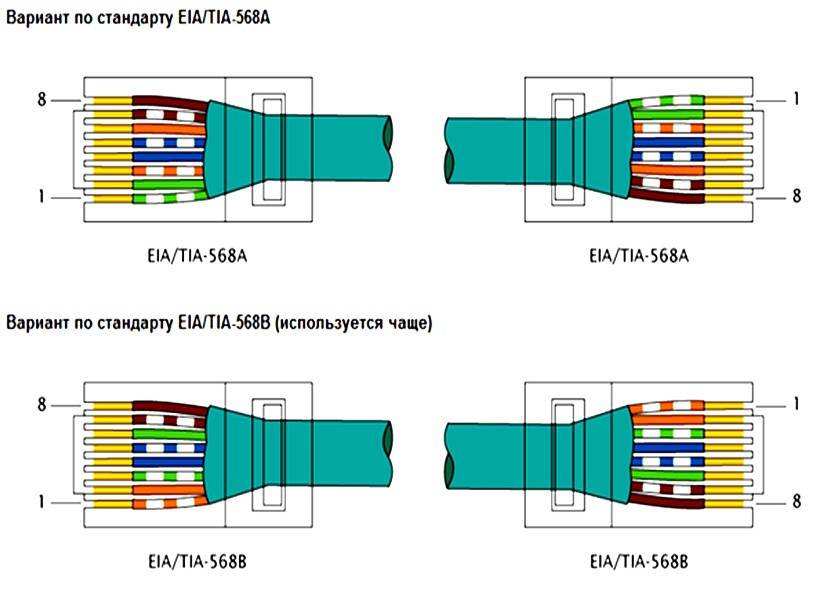
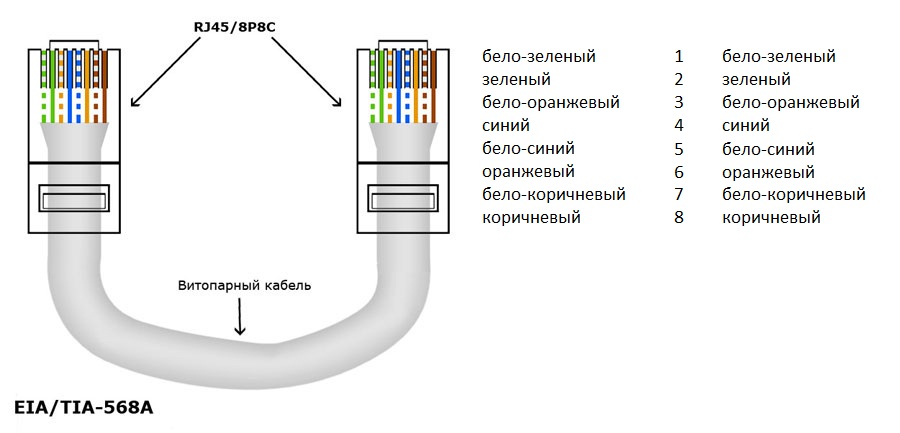
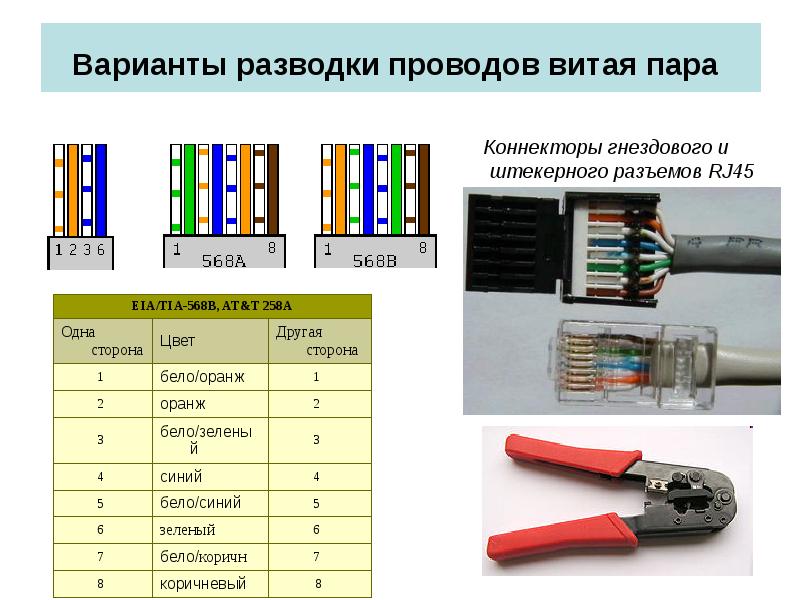
- crimping using the EIA / TIA-568A standard
- crimping according to EIA / TIA-568B standard (more often used)
Crossover cable
- crimping to reach speeds of 100 Mbps
These schemes can provide both 100-megabit and gigabit connections. To achieve 100-megabit speed, it is enough to use 2 pairs out of 4 - green and orange. The remaining two pairs can be used to connect another PC. Some users split the end of the cable into a "double" cable, however this cable will have the same characteristics as a single cable and may result in poor quality and data transfer speed.
IMPORTANT! A cable crimped contrary to the requirements of the standard may not work properly! What will be expressed in a large percentage of the loss of transmitted data or in the complete inoperability of the cable (it all depends on its length). To check the correctness and efficiency of cable crimping, special cable testers are used.
This device includes a transmitter and receiver. The transmitter sends a signal to each of the cable cores and duplicates the transmission with an indication using LEDs on the receiver. If all 8 indicators light up in order, then there are no problems, and the cable is crimped correctly
To check the correctness and efficiency of cable crimping, special cable testers are used. This device includes a transmitter and receiver. The transmitter sends a signal to each of the cable cores and duplicates the transmission with an indication using LEDs on the receiver. If all 8 indicators light up in order, then there are no problems, and the cable is crimped correctly.
Cross-wiring options are limited to Power over Ethernet, standardized in IEEE 802.3af-2003.This standard begins to function automatically if the conductors in the cable are connected "one to one".
coaxial wire
The very first cable designed to connect the Internet. Patented in 1880, used to transmit high frequency signals. In modern times, it is rarely used, but it is impossible to completely exclude it.
The device looks like this:
- It consists of a central conductor.
- The conductor is surrounded by insulation from a dense layer.
- Next comes the copper or aluminum braid.
- Outside covers a rubber insulating layer of a few millimeters.
It is divided into two types: thick and thin. Each variety is used depending on the application environment. The specificity of such a wire is increased flexibility and signal attenuation speed. Therefore, the transmission speed is not designed for long distances, it reaches a maximum of 10 Mbps.
Now the coaxial type is not used for the Internet due to too low speed. The only area of application is cable television. However, it also gradually disappears, as modern routers allow you to install wireless TV.
Types of Internet cable connectors for coaxial wire is a large collection consisting of:
- A BNC connector installed at the ends of a wire to connect to other connectors.
- BNC T-shape. This is a tee to connect the device to the trunk. Contains three connectors, one of which is required for the network card.
- A barrel-type BNC is required if the connection between the trunks is broken or the length needs to be increased.
- BNC terminator. This is a stub that blocks signal propagation. Two grounded terminators are required for the network to function properly.
What equipment to buy for a home fiber optic network
The equipment through which client devices access the Internet via fiber optics is usually provided by the ISP. But these are, as a rule, the simplest budget devices with a limited set of features. If you want something faster, more powerful, more functional, get it yourself.
To build a home network from "motley" devices, you will need a router (router) with a port for connecting SFP, SPF +, XPF, PON or GPON optics - as they are designated on the body of the device. Unlike the generic RJ-45, fiber optic connectors come in several types (shapes). Which one is right for you, it is better to check with the provider with whom you plan to conclude an agreement. The most common is called SC/APC.





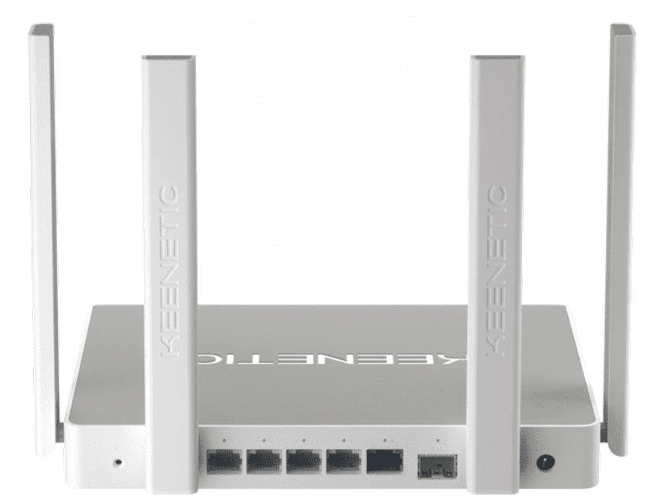
However, the type of connector is not the only difference between such routers. Fiber optic ports have different bandwidth, and it should be specified in the specifications of the machine.
Inside the router, the optical signal is converted into electrical and radio, which are understood by the connected devices - PCs, phones, and so on. They receive a signal through LAN (Ethernet) and Wi-Fi interfaces. The speed of the network also depends on the bandwidth of the latter.
To maximize the potential of fiber optic communication, all network interfaces of the router must support modern high-speed standards. Namely:
- SFP/SPF+/XPF - no less than the provider's speed according to the tariff plan. Some manufacturers indicate 2 values \u200b\u200bhere - the speed of receiving and transmitting a signal, others - only the largest.
- LAN (Ethernet) - 1 Gb / s.
- Wi-Fi - 802.11b/g/n/ac.With the support of this standard, the theoretically achievable connection speed for routers with 8 antennas is 6.77 Gbps.
Below is a small list of router models that support fiber optic connections. They differ in features and price.
- TP Link TX-VG1530
- D-Link DPN-R5402C
- ZyXEL PSG1282NV
- D-Link DVG-N5402GF
- ZyXEL PSG1282V
- Keenetic Giga
Which one is better? The one that best meets your needs and is as close as possible to the parameters of your network. However, with the similarity of the basic data, additional functions come to the fore, and they are very different here. Choose and use.
Happy connection!
Standard crimp patterns
The pinout of a twisted pair and the installation of connectors falls under the regulations of the international standard EIA / TIA-568, which describes the procedure and rules for switching intra-apartment networks. The choice of crimping scheme depends on the purpose of the cable and the characteristics of the network - for example, on bandwidth.
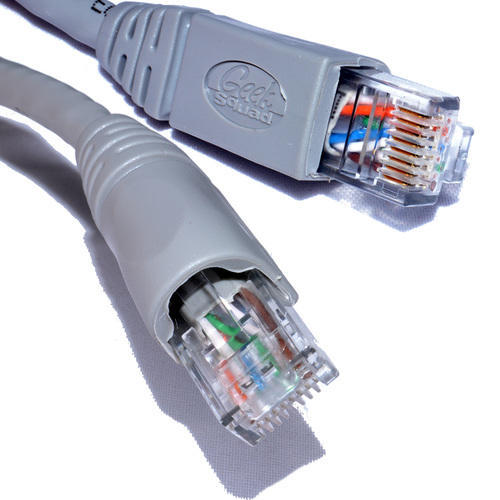
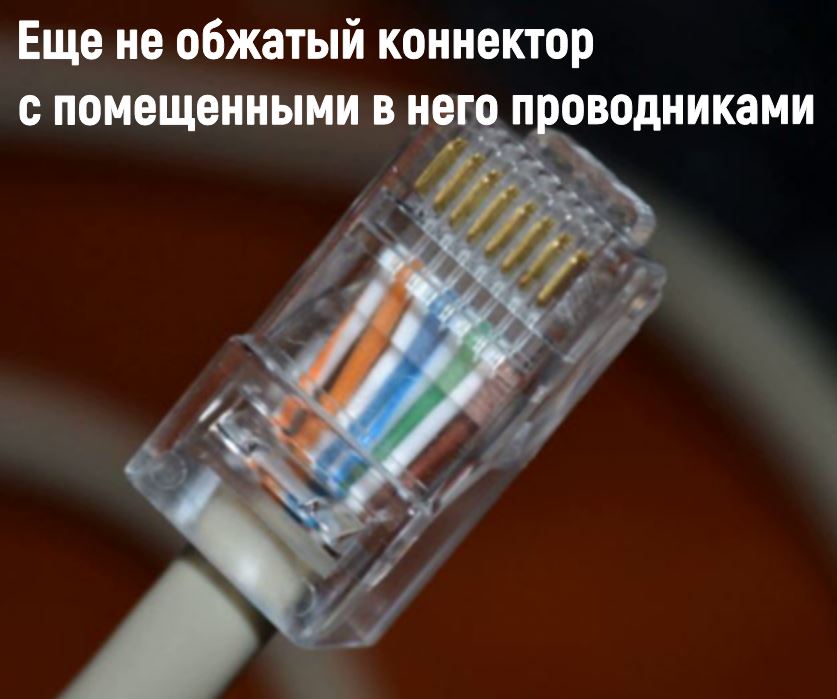
Thanks to the transparent body of the connector, you can see that the cores are arranged in a certain order, and not at random. If you mix up a pair of conductors, switching will be broken
Both types of cables - 4 or 8 cores - can be crimped in a straight or cross way, as well as using type A or B.
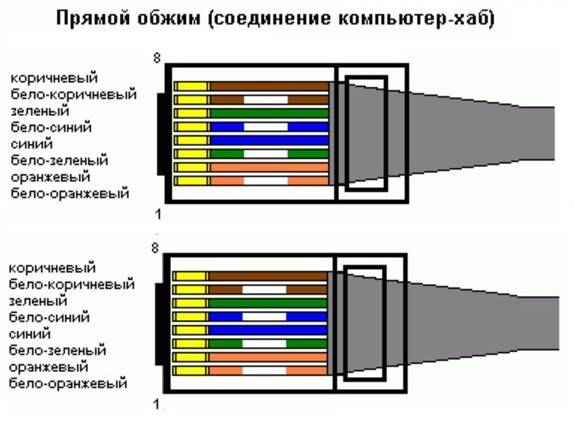
Option #1 - straight 8-wire cable
The direct crimping method is used when two devices need to be connected:
- on the one hand - PC, printer, copier, TV;
- on the other hand - a router, a switch.
A feature of the method is the same crimping of both ends of the wire, for the same reason the method is called direct.
There are two interchangeable types - A and B. For Russia, the use of type B is typical.
Pinout diagram for an 8-wire cable for direct connection of a computer to a switching device (HAB, SWITCH). In the first position - an orange-white vein
In the USA and Europe, on the other hand, type A crimping is more common.
Type A differs from type B in the arrangement of conductors located in positions 1,2,3 and 6, that is, white-green / green are interchanged with white-orange / orange
You can crimp in both ways, the quality of data transfer will not suffer from this. The main thing is to observe the sequence of lived.
Option #2 - 8-wire crossover
Cross crimping is used less frequently than direct crimping. It is necessary if you need to connect two desktop computers, two laptops or two switching devices - a hub.
The crossover is used less and less, as modern equipment can automatically determine the type of cable and, if necessary, change the signal. The new technology is called auto-MDIX. However, some home devices have been working properly for years, it makes no sense to change them, so cross crimping can also come in handy.
Cross crimping retains the ability to use types A and B.
Crossover circuit designed for equipment of high-speed networks (up to 10 gbit / s), made according to type B. All 8 conductors are involved, the signal passes in both directions
To use type A, you need to change all the same 4 positions: 1, 2, 3 and 6 - white-green / green conductors with white-orange / orange.
For a network with a lower data transfer rate of 10-100 mbit / s - other rules:
Type B scheme. Two pairs of twists - blue-white / blue and white-brown / brown - are connected directly, without crossing
The scheme of standard A completely repeats B, but in a mirror image.
Option #3 - straight 4-wire cable
If an 8-wire cable is required for high-speed information transmission (for example, Ethernet 100BASE-TX or 1000BASE-T), then a 4-wire cable is sufficient for "slow" networks (10-100BASE-T).
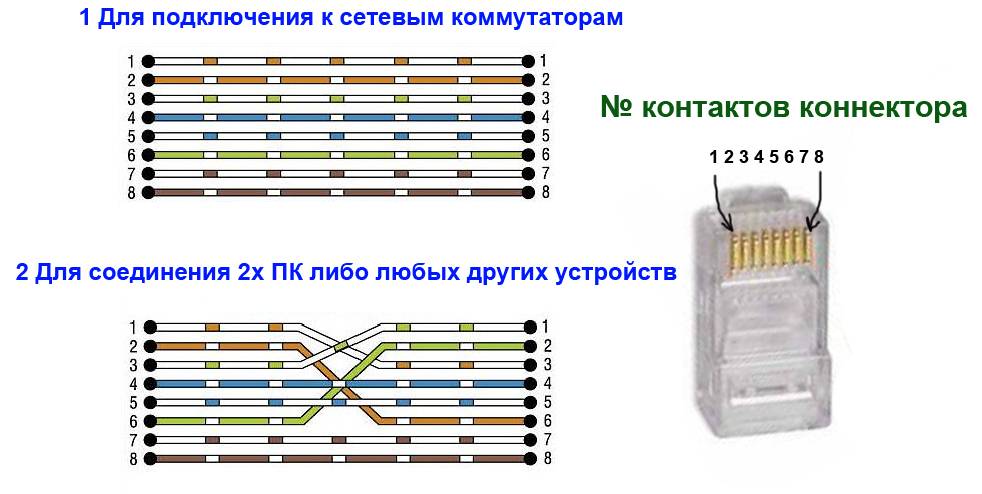
Scheme of crimping the power cord for 4 cores. Out of habit, two pairs of conductors are used - white-orange / orange and white-green / green, but sometimes two other pairs are also used.
If the cable fails due to a short circuit or break, you can use free ones instead of the used conductors. To do this, cut off the connectors and crimp two pairs of other cores.


Option #4 - 4-wire crossover
For cross crimping, 2 pairs are also used, and you can choose twists of any color. By tradition, green and orange conductors are often chosen.
The 4-wire cable crossover crimping scheme is used extremely rarely, mainly in home networks, if you need to connect two old computers together. The choice of wire color does not affect the quality of data transmission.
Cable Selection Criteria
Such a cable has many characteristics, but only a few of them are important for selection. These include: conductor category, core type, shielding method. Let's consider each of them in detail.
Criterion #1 - Internet cable category
There are seven categories of twisted pair cable—from Cat.1 to Cat.7.
Cords of different categories differ in the efficiency of the transmitted signal:
- The first category Cat.1 has a bandwidth of only 0.1 MHz. Use such a conductor to transmit voice data using a modem.
- The Cat.2 category has a bandwidth of 1 MHz. The data transfer rate here is limited to 4 Mbps, so this conductor is considered obsolete and almost never used.
- For category Cat.3, the frequency band is 16 MHz. Data transfer speed - up to 100 Mbps. Used to create local and telephone networks.
- Cat. 4 - cable with a bandwidth of 20 MHz maximum. The data transfer rate is no more than 16 Mbps.
- Cat.5 has a maximum bandwidth of 100 MHz and a maximum data rate of 100 Mbps. Scope of application - the creation of telephone lines and local networks.
- Cat.5e has a bandwidth of 125 MHz. Speed - up to 100 Mbps and 1000 Mbps (for a four-pair wire). This cable is the most popular when building computer networks.
- For Cat.6, the acceptable bandwidth is 250 MHz. Transmission speed - 1 Gb / s at a distance of up to 50 m.
- Cat.6a has a bandwidth of 500 MHz. Speed - up to 10 Gb / s in a range of up to 100 m.
- Cat.7 has a bandwidth of 600-700 MHz. The speed of this wire for the Internet is up to 10 Gbps.
- Cat.7a. The bandwidth is up to 1200 MHz. Speed - 40 Gb / s for a length of 15 m.
The higher the cable category, the more pairs of conductors it contains. At the same time, in each pair, there are more pairs of turns per unit length.
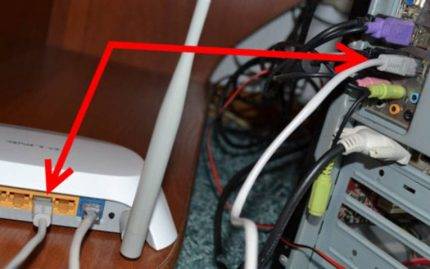 When connecting additional devices to the computer, you need to select the cable according to all the rules. There should be latches at the ends of the cable. They will allow you to firmly fix the conductor in the socket.
Criterion #2 - type of cable core
Cable cores are divided into copper and copper-plated. The first type is considered better.
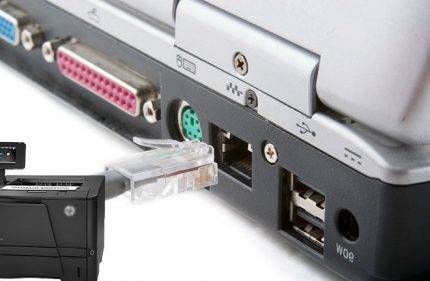 You can connect a printer with a power cord. To avoid problems with signal transmission, you need to choose both a cable and good quality connectors
They use a cable with such a core for an extensive and fast network - more than 50 m. The second type is somewhat cheaper, and the losses in it are not so big.
Its core is an inexpensive cable with low conductivity. It is covered with copper, which has high conductivity. Since the current flows on the copper side of the conductor, the conductivity suffers little.
When purchasing a copper-bonded cable, you have to make a choice between its two types - CCS and CCA. The difference between them is at the core. For CCS it is a steel conductor, for CCA it is aluminum. The second from copper is not much different.
Installation of a steel conductor can be difficult, since steel, as a not very elastic material, is prone to fracture.
At a limited distance, the discrepancy between the copper and copper-plated cable is hardly noticeable. If the distance is more than 100 m, the aluminum core cable simply will not transmit the signal.
The reason for poor switching is the higher resistance of aluminum than that of copper. As a result, the current at the output has insufficient power and the network components do not “see” each other.
Criterion #3 - cable shield
The shield is necessary to protect the conductor from electromagnetic noise from other cables. It must also compensate for the radiation of the electromagnetic field of the twisted pairs themselves.
If there are power cables up to 380 V nearby with a core cross section of less than 4 squares, one screen is required. In this case, an FTP cable is the best option.
It is important to remember that shielded cables are used in tandem with shielded connectors. The difference between them and the standard ones is in the metal part. When it is supposed to be adjacent to a conductor from 380 V with a core cross section of up to 8 squares, a double screen is required
A good option is F2TP
When it is supposed to be adjacent to a conductor from 380 V with a core cross section of up to 8 squares, a double screen is required. A good option is F2TP.





The proximity of high-voltage cables from 1000 V with a core of 8 squares implies the laying of both power and network cables in individual corrugations. Screen option - SF / UTP.
In everyday life, such cables are not used. Here, the most commonly used unshielded cable belongs to category 5e type UTP.
Marking
The Internet cable markings printed on it are a good way to understand what the wire is.

Marking example: NetLink PVC CAT5E UTP 4Pair 24 AWG.
Decryption:
- NetLink is a manufacturer;
- PVC - PVC braid;
- Cat5E - category 5E;
- UTP - no shielding;
- 4Pair - 4 pairs;
- 24 AWG - section type.
Another example: Cabeus FTP-4P-Cat.5e-SOLID-OUT
Decryption:
- Cabeus - manufacturer;
- FTP - foil protection;
- 4P - 4 pairs;
- 5e - category 5e;
- Solid - one core;
- OUT - for outdoor installation.
Thus, knowing the characteristics of an Internet cable, one can understand by the designations on its outer shell what it is and whether it is suitable for the user's tasks.
So what is better - optics or copper twisted pair
Today, any large and even medium-sized Internet provider uses fiber optics in a number of segments of its networks. And vice versa: no matter how the provider lures by connecting to the "fastest system of the new generation", certain sections of its networks are a traditional copper cable. It's just that the rules dictate the conditions of the environment (somewhere they are more suitable for copper, and somewhere - for optics) and economic feasibility, and marketing is marketing.
No one can say for sure which type of highway the Bronze Horseman and Optical Illusion providers connected your house to, so we will assume that their offers differ only in the way subscribers are connected inside the apartments.
The table below compares the properties of fiber optics and twisted pair:
| Optical fiber | Copper twisted pair | |
| Theoretically achievable communication speed | OS1 - 40 Gbps OS2 - 100 Gbps OM3 and OM4 - 100 Gbps | Up to 10 Gbps for category 6 and 7 cables. |
| Maximum length of a non-breaking line | OS1 - 100 km OS2 - 40 km OM3 - 300 m OM4 - 125 m. | 100 m |
| Physical properties of the cable | Thin, fragile | Thick, flexible |
| Exposure to external influences | Excessive bending, pressure, some types of radiation | EMI, atmospheric electricity, corrosive chemicals, fire, tampering with reading data |
| Compatibility with client equipment | Requires purchase of special adapters | Compatible with any device equipped with RJ-45 jacks |
| Service | Requires specialized equipment and training | Requires minimal skills and knowledge |
| Price | high | Low |
Let's summarize:
- An optical fiber line is up to 10 times faster and much more "long-range" than twisted pair, it is not affected by interference from electrical equipment and power lines, it is durable and strong, does not burn, does not lose its properties from moisture, acids and alkalis. Prevents spy taps and eavesdropping by inductive connection.
- A fiber-optic network is easier to disguise in an interior; it does not require the installation of wide, unaesthetic cable channels.
- Fiber optics is glass, though flexible, and any glass can crack and crumble.Therefore, the installation and modernization of such a network requires great care. If a damaged twisted pair can be cut and connected with a simple twist, then to restore the broken optics, you need a special welding machine and the ability to handle it. And sometimes even a slight damage to the fiber optic line requires its complete replacement.
- The main advantage of twisted pair cable is its low cost and ease of use. For connecting to the Internet via a copper cable, you will most likely not be charged any extra money, and you will have to pay for optics, because they are expensive. A twisted pair cable with a universal connector can be immediately plugged into a computer - and the Internet will appear on it. For optics, you will again have to fork out for a special socket, modem (ONT-terminal or router), network adapters. And it's also not cheap.
Pure fiber-optic networks inside houses and apartments are still very rare, most often they are made hybrid - partly optical, partly copper-wire, partly wireless. The optics are usually connected only to the modem, and the end devices - computers, smartphones, smart TVs, etc. receive the Internet via the same twisted pair cable or Wi-Fi, because they are not equipped with light signal decoding modules. This means that no matter what super-speeds the provider promises you, slow network segments will nullify it.
So, your choice is "The Bronze Horseman" if:
- You don't want to overpay for something you probably won't get. If your devices - consumers of Internet traffic are running on outdated Ethernet or Wi-Fi protocols, then optics will not make them faster.
- You often carry your computer from place to place, you have a dog who likes to chew on wires or small children who grab everything. And in case of damage to the cable, it is easier for you to fix it yourself than to pay the master.
You are better off becoming an Optical Illusion client if:
- You are for everything new against everything old. Fiber optics is the technology of the future and therefore worthy of investment. And even if she is not friends with every device, soon, we should expect, the manufacturers of the latter will come to their senses and equip their products with fiber optic support. After all, consumers want it and are ready to invest.
- Finances are not a problem for you. You have modern technology that supports the latest wired and wireless protocols, and you are ready to make it "take the maximum height."
- You need speed, and that says it all.
- Network security in terms of possible data leakage is your everything.
Fiber optic connection
Most well-known providers have already updated their own lines and use fiber optics and related equipment to connect subscribers. This is more convenient for a number of reasons:
- good throughput;
- long lines without degrading the signal quality;
- saved space in OLT cabinets.
Some providers offer the introduction of fiber into the premises, which provides a stable high quality signal.
But even when entering an optical fiber into an apartment, it is better to do the wiring inside from a twisted pair. It is cheaper and easier to install. The fiber optic wire is fragile, afraid of kinks. If it is damaged, the signal will be lost.




For these reasons, a special optical fiber is introduced into an apartment or house and connected to a converter, and twisted pair is bred from the latter around the room.
twisted pair
I like it I don't like it
Internet connection using fiber optics
The most common Internet in the Russian Federation, whose network operates on the basis of fiber, is provided by the provider Rostelecom. How to connect fiber optic internet?
First, you just need to make sure that the optical cable is connected to the house. Then you need to order an Internet connection from the provider. The latter must report the data that provides the connection. Then you need to configure the equipment.
It is done like this:
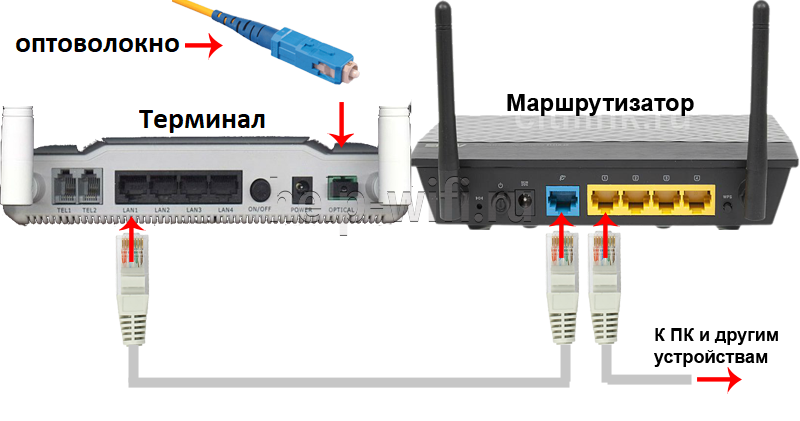
- After carrying out the fiber and connecting the equipment that provides work in optical passive networks, the employees of the provider company, all subsequent configuration is performed independently.
- First of all, the yellow cable and socket are installed as shown in the figure below.
- You can have your own Wi-Fi router, it is not necessary to purchase a router from Rostelecom. A fiber optic cable, an optical terminal and the main cord are connected to Wi-Fi, through which the router is connected to an optical outlet.
- It is necessary to choose the most ventilated place for the installation of all equipment. The installer from the provider company should indicate exactly where the network elements are to be installed.
The terminal is equipped with a special socket that allows you to connect to a computer and connect the router to the Internet. In addition, the terminal has 2 additional jacks that allow you to connect an analog home telephone to the fiber optic connection, and several more jacks are provided for connecting television.
High tech economy
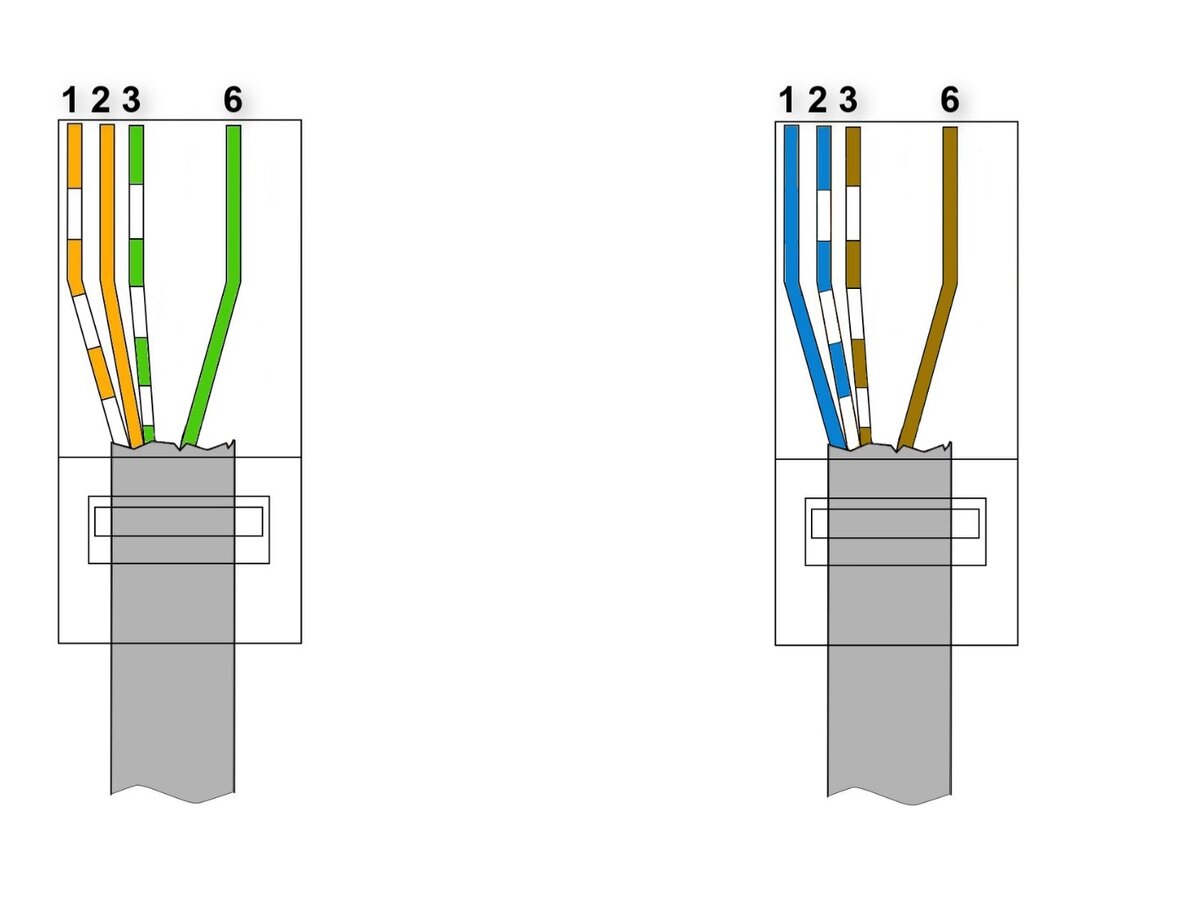
Twisted pair is characterized by one interesting feature. With a direct connection scheme, the device can use not 4 pairs of conductors, but 2.That is, using one cable, it is permissible to connect 2 computers to the network at the same time. Thus, you can save on cable or make a connection if it really needs to be done, but there are no extra meters of twisted pair at hand. True, in this case, the maximum data exchange rate will not be 1 Gb / s, but 10 times less. But for organizing a home network, this is acceptable in most situations.
How to distribute the veins in this case? In relation to the pins on the connectors for connecting the first computer:
- 1 contact: white-orange core;
- 2nd: orange;
- 3rd: white-green;
- 6th: green.
That is, 4, 5, 7 and 8 cores are not used in this scheme. In turn, on the connectors for connecting a second computer:
- 1 contact: white-brown core;
- 2nd: brown;
- 3rd: white-blue;
- 6th: blue.
It can be noted that when implementing a cross connection scheme, you must always use all 8 conductors in a twisted pair. Also, if the user needs to implement data transfer between devices at a speed of 1 Gb / s, the pinout will need to be done according to a special scheme. Let's consider its features.



